blockTrimAndRespond
Information
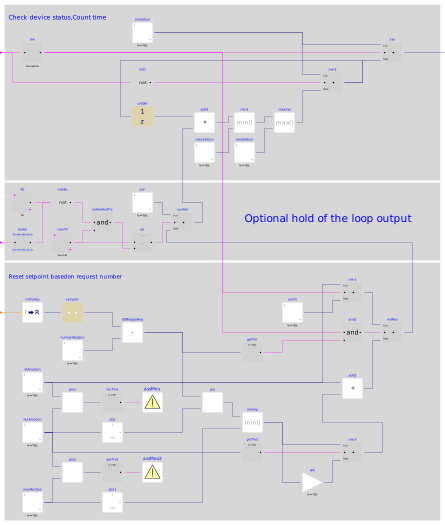
This block implements the trim and respond logic according to Section 5.1.14.3 and 5.1.14.4 of ASHRAE Guideline 36, May 2020.
For each upstream system or plant set point being controlled by a trim and respond loop, define the initial values in system or plant sequences. Values for trim, respond, time step, etc. shall be tuned to provide stable control.
| Variable | Value | Definition |
|---|---|---|
| Device | AHU Supply Fan | Associated device |
| SP0 | iniSet | Initial setpoint |
| SPmin | minSet | Minimum setpoint |
| SPmax | maxSet | Maximum setpoint |
| Td | delTim | Delay timer |
| T | samplePeriod | Time step |
| I | numIgnReq | Number of ignored requests |
| R | numOfReq | Number of requests |
| SPtrim | triAmo | Trim amount |
| SPres | resAmo | Respond amount |
| SPres_max | maxRes | Maximum response per time interval |
The trim and respond logic shall reset setpoint within the range minSet to
maxSet.
When the associated device is off (uDevSta=false), the setpoint
shall be iniSet.
The reset logic shall be active while the associated device is proven
on (uDevSta=true), starting delTim after initial
device start command.
When active, every time step samplePeriod, trim the setpoint by
triAmo.
If there are more than numIgnReq requests, respond by changing
the setpoint by resAmo*(numOfReq-numIgnReq), i.e., the number of
requests minus the number of ignored requests, but no more than maxRes.
In other words, every time step samplePeriod:
- Change setpoint by
triAmo; - If
numOfReq > numIgnReq, also change setpoint byresAmo*(numOfReq -numIgnReq)but no more thanmaxRes.
Hold and release loop output
Optionally, if the parameter have_hol is set to true, an additional
input signal uHol allows for holding the trim and respond loop output
at a fixed value for the longer of the time the input uHol remains true
and the duration specified by the parameter dtHol.
When uHol switches back to false, the hold is released and resetting
continues from the previously held value (without reinitializing to iniSet
or going through a delay time of delTim).
This is typically used in control sequences to freeze the reset logic during the plant
staging process.
Consider for example the following specification:
"When a plant stage change is initiated, the reset logic shall be disabled and value
fixed at its last value for the longer of 15 minutes and the time it takes
for the plant to successfully stage."
Using this block with have_hol=true and dtHol=15*60
yields the following sequence of events.
- 0:00 - Stage change is initiated. T&R loop output is at 50 %.
- 0:12 - Stage change is completed. T&R loop output remains at 50 % since < 15 minutes have elapsed.
- 0:15 - T&R is released and continues resetting from 50 %.
Examples
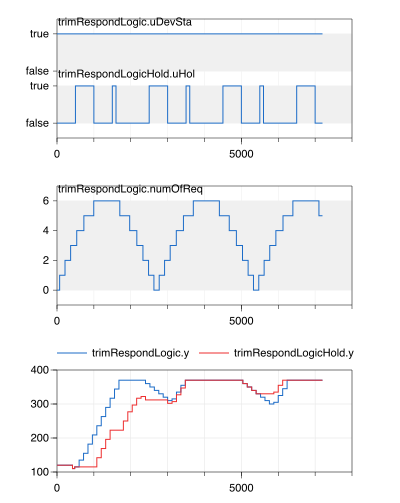
The figure below illustrates the trim and respond logic with a negative trim amount, comparing scenarios with and without holding the loop output.
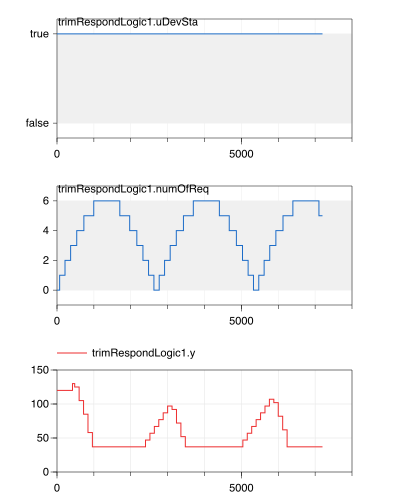
The figure below illustrates the trim and respond logic with a positive trim amount.
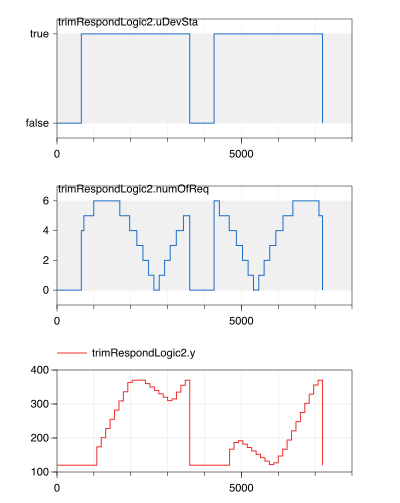
The figure below illustrates the trim and respond logic with a negative trim amount, in a scenario where the equipment switches on and off.
Parameters
| Type | Name | Default | Description |
|---|---|---|---|
| Boolean | have_hol | false | Set to true to allow holding the reset, false to continuously reset when enabled |
| Real | iniSet | Initial setpoint | |
| Real | minSet | Minimum setpoint | |
| Real | maxSet | Maximum setpoint | |
| Real | delTim | Delay time | |
| Real | samplePeriod | Sample period of component | |
| Integer | numIgnReq | Number of ignored requests | |
| Real | triAmo | Trim amount | |
| Real | resAmo | Respond amount (must have opposite sign of triAmo) | |
| Real | maxRes | Maximum response per time interval (must have same sign as resAmo) | |
| Real | dtHol | 0 | Minimum hold time |
Connectors
| Type | Name | Default | Description |
|---|---|---|---|
| Buildings.Controls.OBC.CDL.Interfaces.IntegerInput | numOfReq | Number of requests from zones/systems | |
| Buildings.Controls.OBC.CDL.Interfaces.BooleanInput | uDevSta | On/Off status of the associated device | |
| Buildings.Controls.OBC.CDL.Interfaces.BooleanInput | uHol | Hold signal | |
| Buildings.Controls.OBC.CDL.Interfaces.RealOutput | y | Setpoint that have been reset |
Components
| Type | Name | Default | Description |
|---|---|---|---|
| Buildings.Controls.OBC.CDL.Logical.TrueDelay | tim | Send an on signal after some delay time | |
| Buildings.Controls.OBC.CDL.Reals.GreaterThreshold | greThr | Check if the real requests is more than ignored requests setting | |
| Buildings.Controls.OBC.CDL.Reals.Switch | netRes | Net setpoint reset value | |
| CDL.Reals.Sources.Constant | resAmoCon | Respond amount constant | |
| Buildings.Controls.OBC.CDL.Reals.Multiply | pro | Products of net requests and respond amount value | |
| Buildings.Controls.OBC.CDL.Reals.Multiply | pro1 | Product of trim and respond amount | |
| Buildings.Controls.OBC.CDL.Reals.Multiply | pro2 | Product of respond and maximum amount | |
| Buildings.Controls.OBC.CDL.Discrete.UnitDelay | uniDel | Output the input signal with a unit delay | |
| Buildings.Controls.OBC.CDL.Reals.Switch | swi | Switch between initial setpoint and reseted setpoint | |
| Buildings.Controls.OBC.CDL.Reals.Switch | swi1 | Before instant (device ON + delTim + samplePeriod), the setpoint should not be trimmed | |
| Buildings.Controls.OBC.CDL.Reals.Switch | swi2 | Reinitialize setpoint to initial setting when device become OFF | |
| Buildings.Controls.OBC.CDL.Reals.Switch | swi3 | Logical switch | |
| Buildings.Controls.OBC.CDL.Discrete.Sampler | sampler | Sample number of requests | |
| Buildings.Controls.OBC.CDL.Reals.LessThreshold | lesThr1 | Check if trim and response amount have same sign | |
| Buildings.Controls.OBC.CDL.Reals.GreaterThreshold | greThr2 | Check if trim and response amount have opposite sign | |
| Buildings.Controls.OBC.CDL.Reals.GreaterThreshold | greThr1 | Check if response amount have positive sign | |
| Buildings.Controls.OBC.CDL.Reals.MultiplyByParameter | gai | Convert results back to negative |
Revisions
-
June 6, 2024, by Antoine Gautier:
Added logic to hold trim and respond loop output. This is for #3761. -
June 3, 2020, by Jianjun Hu:
Upgraded according to G36 official release. -
April 13, 2020, by Jianjun Hu:
Corrected to delay the true initial device status. This is for #1876. -
August 28, 2019, by Jianjun Hu:
Added assertions and corrected implementation when response amount is negative. This is for #1503. -
July 10, 2017, by Jianjun Hu:
First implementation.