
modelEnable
Validation sequence of enabling and disabling tower fans
Information
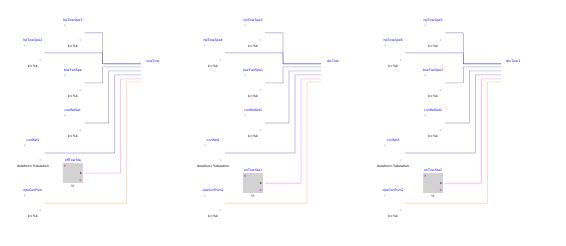
This example validates Buildings.Controls.OBC.ASHRAE.G36.Plants.Chillers.Towers.FanSpeed.ReturnWaterTemperature.Subsequences.Enable. It shows the sequences for enabling and disabling the tower fans under different conditions.
-
The instance
enaTowshows that the tower fans will be enabled when:-
The enabled chiller's head pressure control maximum tower fan speed is greater
than the tower minimum speed
fanSpeMin, and -
The tower temperature
TTowrises above setpointTTowSetby 1 °F, and - The tower fan has been OFF for at least 1 minute.
-
The enabled chiller's head pressure control maximum tower fan speed is greater
than the tower minimum speed
-
The instance
disTowshows that all the tower fans should be disabled when the enabled chiller's head pressure control maximum tower fan speeduMaxTowSpeSethas equaled tower minimum speedfanSpeMinfor 5 minutes. -
The instance
disTow1shows that all the tower fans should be disabled when the tower fan speeduFanSpehas been at the minimum speed for 5 minutes and the tower temperatureTTowdrops below the setpoint minus 1 °F.
Components
| Type | Name | Default | Description |
|---|---|---|---|
| Buildings.Controls.OBC.ASHRAE.G36.Plants.Chillers.Towers.FanSpeed.ReturnWaterTemperature.Subsequences.Enable | enaTow | Enabling tower fans | |
| Buildings.Controls.OBC.ASHRAE.G36.Plants.Chillers.Towers.FanSpeed.ReturnWaterTemperature.Subsequences.Enable | disTow | Disable tower fans due to the low head pressure control maximum tower fan speed | |
| Buildings.Controls.OBC.ASHRAE.G36.Plants.Chillers.Towers.FanSpeed.ReturnWaterTemperature.Subsequences.Enable | disTow1 | Disable tower fans due to low fan speed and low tower temperature |
Revisions
-
August 12, 2019, by Jianjun Hu:
First implementation.