
packageUsersGuide
Extends from Modelica.Icons.Information (Icon for general information packages).
Information
This package contains models demonstrating the co-simulation coupling between Modelica and TOUGH 3.
The model Buildings.Fluid.Geothermal.Borefields.TOUGH.OneUTube assumes that all boreholes in the borefield have the same heat transfer with the ground, and that the ground thermal response is simulated by the TOUGH simulator through Buildings.Fluid.Geothermal.Borefields.TOUGH.BaseClasses.GroundResponse.
Note that for this co-simulation, the TOUGH 3 simulator must be installed. However, for demonstration purposes, the test models in this package call a code that emulates the TOUGH response.
When to use the model
TOUGH 3 simulations are needed for modeling geothermal energy systems in which the underground geology is complex. For instance, when there is strong underground water flow, other models such as those based on g-functions that assume heat transfer in the ground is purely by conduction are not applicable, as these g-function-based models do not account for the advective heat transfer due to the water flow.
How the coupling works
The coupling is implemented through the instance pyt in the class
Buildings.Fluid.Geothermal.Borefields.TOUGH.BaseClasses.GroundResponse.
It instantiates the Python interface model
Buildings.Fluid.Geothermal.Borefields.TOUGH.BaseClasses.Real_Real, which can send data to Python
functions and receive data from it. It enables computations to be performed inside
a Python module that calls an external simulator, which in this case is the TOUGH 3 simulator.
Python interface
The interface is instantiated as follows:
  Buildings.Fluid.Geothermal.Borefields.TOUGH.BaseClasses.Real_Real pyt(
    final startTime=startTime,
    final moduleName="GroundResponse",
    final functionName="doStep",
    final nDblRea=nSeg+3*nInt,
    final nDblWri=2*nSeg + 6,
    final samplePeriod=samplePeriod,
    final strWri={touWorDir},
    final flag=0,
    final passPythonObject=true)
The coupled simulation calls the function
doStep of the Python module GroundResponse.
The interface specifies through nDblRea the number of values read from
the Python function,
and through nDblWri the number of values written to the Python function.
The argument samplePeriod specifies the sampling period,
strWri specifies the temporary working directory for TOUGH simulation,
and flag configures whether to use the instantaneous value, an average
over the interval, or the integral over the interval. Setting the parameter
passPythonObject to true enables passing a Python object
from one invocation to the next, thereby reusing Python data from one call to another.
More explanation about the Python setup can be found in
Buildings.Utilities.IO.Python_3_12.UsersGuide.
The above interface calls the Python function doStep as shown below,
where only the major sections are illustrated:
  def doStep(dblInp, state):
    # retrieve state of last invocation, including
    #   -- the path of the working directory
    #   -- the Modelica simulation start time
    #   -- the end time of the last TOUGH simulation,
    #   -- the heat flow on the borehole wall that was measured in Modelica at last invocation,
    #   -- the borehole wall temperature at the end of last TOUGH simulation.
    tou_tmp = state['work_dir']
    startTime = state['startTime']
    tLast = state['tLast']
    Q_stored = state['Q']
    T_stored = state['T_tough']

    # Map the heat flow rate in the Modelica domain mesh points (borehole segments)
    # to the TOUGH boundary mesh point
    Q_toTough = mesh_to_mesh(toughLayers, modelicaLayers, Q_stored, 'Q_Mo2To')

    # Update TOUGH input files for each TOUGH call:
    #   -- update the INFILE to specify beginning and ending TOUGH simulation time
    #   -- update the GENER for specifying the heat flow boundary condition
    write_incon()

    # Conduct one step TOUGH simulation with TOUGH executable
    # The TOUGH simulation requires:
    #   -- the INCON as the initial condition, including temperature, pressure at the mesh points
    #   -- the INFILE for specifying the ground properties and the initial and end simulation time,
    #   -- the GENER file for the heat flux boundary condition at the borehole wall
    # The simulation will generate a SAVE file.
    # os.system("/opt/esd-tough/tough3-serial/tough3-install/bin/tough3-eos3")
    # Dummy code to imitate the TOUGH simulation. It is to demonstrate the
    # Modelica-TOUGH coupling process
    tough_avatar(Q_toTough, T_out, nInt)

    # Extract borehole wall temperature from TOUGH simulation result, for Modelica simulation
    read_save()
    data = extract_data('out.txt', nTouSeg, nInt)
    T_tough = data['T_Bor']

    # Map the temperature of the borehole wall in the TOUGH mesh points to
    # the Modelica domain mesh point
    T_toModelica = mesh_to_mesh(toughLayers, modelicaLayers, T_tough, 'To2Mo')

    # Outputs to Modelica, including the results of the interested ground points
    ToModelica = T_toModelica + data['p_Int'] + data['x_Int'] + data['T_Int']

    # Update state
    state = {'tLast': tim, 'startTime': startTime, 'Q': Q, 'T_tough': T_tough, 'work_dir': tou_tmp}
  return [ToModelica, state]
The argument dblInp to the Python function is an array with size
nDblWri. It includes:
-
nSeg: The total number of borehole segments specified in Modelica. -
nTouSeg: In the TOUGH mesh, the total number of grids that covers the entire borehole length. -
nInt: The total number of interested points in the TOUGH mesh. -
QBor_flow[nSeg]: The heat exchange flow rate between each borehole segment and the ground. -
TBorWal_start[nSeg]: The initial temperature of each borehole wall segment. -
TOut: The outdoor air temperature. It will become the ground surface temperature for the TOUGH simulation. -
clock.y: The current clock time. -
hBor: The total height of the borehole.
Coupling workflow
The borehole wall is the boundary between the Modelica simulation and the TOUGH simulation. Modelica provides the heat flow rate through the borehole wall as the boundary condition for TOUGH, and TOUGH returns the wall temperature as the boundary condition for Modelica. The flow chart below shows the overall coupling workflow at each time step.
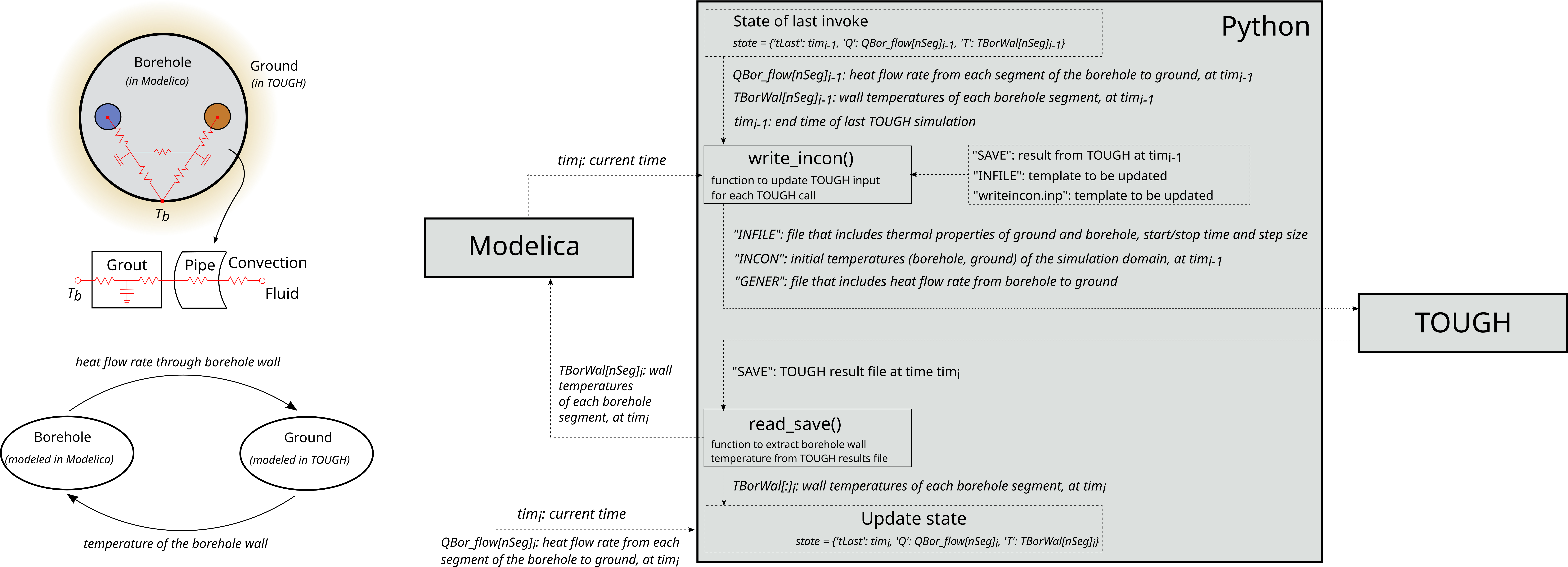
When the Modelica variable sampleTrigger
(see
Buildings.Utilities.IO.Python_3_12.Real_Real) is true, Modelica
calls the TOUGH simulation through the ground response model as described above.
Through the function doStep, the Python module sends to TOUGH the heat
flow rates from the ground QBor_flow, the ambient air temperature
TOut and the current clock time. The following steps are done inside
the Python function:
- On the first invocation of the Python function, the Python object is not yet initialized. The Python function takes the initial temperature and heat flow rate from Modelica to initialize the Python object. It does not start the TOUGH simulation.
-
Before each TOUGH simulation, the function
write_incon()updates the following TOUGH input files located in the folder"Path_To_Buildings_Library"/Resources/Python-Sources/TOUGH:-
writeincon.inp: It contains the initial borehole wall temperature, initial ground surface temperature, and the heat flow rate. The borehole wall temperature will be replaced with the borehole wall temperature stored in thestate. The surface temperature will be replaced by current outdoor temperatureTOut. The heat flow rate is the one computed by the Modelica model,QBor_flow[nSeg]. -
INFILE: It is a structured, keyword-based file that contains TOUGH simulation settings like the ground material properties and the simulation parameters. The simulation times will be edited in the way that the start time is replaced by the one stored in thestateand the stop time is replaced by the current clock timeclock.y. -
INCON: It contains the initial conditions of all the TOUGH mesh points, including the borehole wall and surface mesh points, of which the temperature will be replaced by the values inwriteincon.inp. -
GENER: It includes the heat flow rate from the borehole segments to the ground. It will be updated with the values inwriteincon.inp. The file does not exist initially but will be created and then updated after the first invocation.
-
- Then a TOUGH simulation is started.
-
After the TOUGH simulation is done, with the function
read_save(), it extracts the borehole wall temperature, and if needed also the temperature of the ground interested points, from TOUGH simulation result fileSAVE. -
Update
stateto store the TOUGH simulation stop time, the heat flow from the borehole wall to ground which is measured by Modelica, and the new borehole wall temperatures at each section.
Assumptions
This implementation of TOUGH is based on the following assumptions:
- All boreholes are connected in parallel.
- All boreholes are uniformly distributed and the distances between them are the same.
- All boreholes have the same inlet water flow rate and temperature.
- All boreholes have the same length, the same radius, and are buried at the same depth below the ground surface.
- The conductivity, capacitance and density of the grout and pipe material are constant, homogeneous and isotropic.
- Inside the borehole grout, the heat conduction is only in the radial direction.
- Each borehole is assumed to have multiple segments, each with a uniform temperature.
How to use the model
Setup TOUGH files
A mesh file (MESH) for the simulation domain should be prepared for the
TOUGH simulation and the simulation domain should be initialized (INCON).
It also requires the INFILE to specify the ground properties and to
set the start and end simulation times. Please refer to the TOUGH manual for
instructions on how to set up these input files.
Update Python Module
The program GroundResponse should be updated if there are changes to
the TOUGH input files MESH and INFILE. The reason is that
the Python script hardcodes the position of the nodes in the MESH and
INFILE.
In particular the assumption is that all the relevant nodes, which are the ones next
to the borehole wall and the ones of the interested ground point, are at the top of
MESH and INFILE. The sub-functions that need to be updated
are:
-
modelica_mesh: This function finds the size of the Modelica mesh. -
mesh_to_mesh: This function maps the mesh difference between TOUGH and Modelica and calculatesTandQfor the respective nodes. The code assumes that theMESHis two-dimensional in the x-z plane. If a different type of mesh is used (e.g., radial), the following two functions also need to be updated. -
find_layer_depth: This function finds the depth of the borehole. -
add_grid_boundary: This function finds the bounds of the TOUGH mesh.
To test the changes, the Python script can be run without Modelica by calling
the doStep function with dummy Q inputs.
Example
The class
Buildings.Fluid.Geothermal.Borefields.TOUGH.Examples.Borefield
demonstrates the usage of the coupling model.
When the TOUGH simulator is not installed, the Python interface module includes a
stub function, def tough_avatar(heatFlux, T_out), that imitates the
TOUGH response for updating the ground temperatures.
def tough_avatar(heatFlux, T_out):
    totEle = len(heatFlux)
    # Generate temperature of the ground elements and the interested points
    fin = open('SAVE')
    fout = open('temp_SAVE', 'wt')

    # based on the old results "SAVE", created new results file "temp_SAVE"
    ......

    # remove the old SAVE file
    os.remove('SAVE')
    os.rename('temp_SAVE', 'SAVE')
References
J. Hu, C. Doughty, P. Dobson, P. Nico, M. Wetter. Coupling subsurface and above-surface models for design of borefields and geothermal district heating and cooling systems. Proceedings, 45th Workshop on Geothermal Reservoir Engineering. https://pangea.stanford.edu/ERE/db/GeoConf/papers/SGW/2020/Hu.pdf.