
blockRealValue
Show Real value from numberPort or from number input field in diagram layer dynamically

Information
This block visualizes a Real number in a diagram animation. The number to be visualized can be defined in the following ways:
- If useNumberPort = true (which is the default), a Real input is present and this input variable is shown.
- If useNumberPort = false no input connector is present. Instead, a Real input field is activated in the parameter menu and the Real expression from this input menu is shown.
The two versions of the block are shown in the following image (in the right variant, the name of the variable value that is displayed is also shown below the icon):
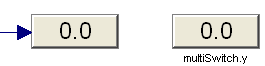
The usage is demonstrated, e.g., in example Modelica.Blocks.Examples.RealNetwork1.
Parameters
| Type | Name | Default | Description |
|---|---|---|---|
| Boolean | use_numberPort | true | = true, if numberPort enabled |
| Integer | significantDigits | 2 | Number of significant digits to be shown |
Connectors
| Type | Name | Default | Description |
|---|---|---|---|
| Modelica.Blocks.Interfaces.RealInput | numberPort | Number to be shown in diagram layer if use_numberPort = true | |
| Modelica.Blocks.Interfaces.RealOutput | showNumber |
Components
| Type | Name | Default | Description |
|---|---|---|---|
| Real | number | 0.0 | Number to visualize if use_numberPort=false (time varying) |