
modelControlledTanks
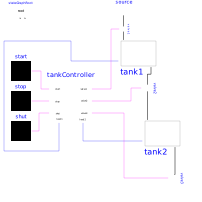
Demonstrating the controller of a tank filling/emptying system
Extends from Modelica.Icons.Example (Icon for runnable examples).
Information
With this example the controller of a tank filling/emptying system is demonstrated. This example is from Dressler (2004), see Literature. The basic operation is to fill and empty the two tanks:
- Valve 1 is opened and tank 1 is filled.
- When tank 1 reaches its fill level limit, valve 1 is closed.
- After a waiting time, valve 2 is opened and the fluid flows from tank 1 into tank 2.
- When tank 1 is empty, valve 2 is closed.
- After a waiting time, valve 3 is opened and the fluid flows out of tank 2
- When tank 3 is empty, valve 3 is closed
The above "normal" process can be influenced by three buttons:
- Button start starts the above process. When this button is pressed after a "stop" or "shut" operation, the process operation continues.
- Button stop stops the above process by closing all valves. Then, the controller waits for further input (either "start" or "shut" operation).
- Button shut is used to shutdown the process, by emptying at once both tanks. When this is achieved, the process goes back to its start configuration. Clicking on "start", restarts the process.
Components
| Type | Name | Default | Description |
|---|---|---|---|
| Utilities.TankController | tankController | ||
| Modelica.Blocks.Sources.RadioButtonSource | start | ||
| Modelica.Blocks.Sources.RadioButtonSource | stop | ||
| Modelica.Blocks.Sources.RadioButtonSource | shut | ||
| Utilities.Tank | tank1 | ||
| Utilities.Tank | tank2 | ||
| Utilities.valve | valve1 | ||
| Utilities.Source | source | ||
| Utilities.valve | valve2 | ||
| Utilities.valve | valve3 | ||
| StateGraphRoot | stateGraphRoot |