functionbodeSISO
Plot bode plot of the corresponding transfer function
Extends from Modelica_LinearSystems2.Internal.PartialPlotFunction (Interface of a plot function).
Information
Syntax
StateSpace.Plot.bodeSISO(ss)
   or
StateSpace.Plot.bodeSISO(
  ss,
  iu,
  iy,
  nPoints,
  autoRange,
  f_min,
  f_max,
  magnitude=true,
  phase=true,
  defaultDiagram=Modelica_LinearSystems2.Internal.DefaultDiagramBodePlot(),
  device=Modelica_LinearSystems2.Utilities.Plot.Records.Device())
Description
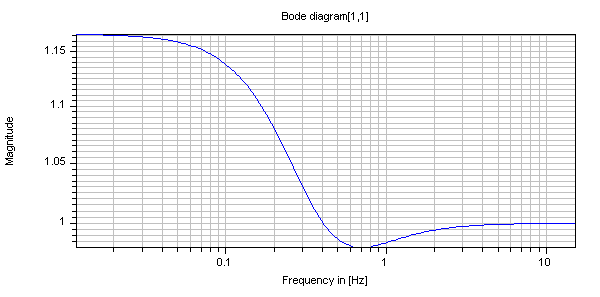
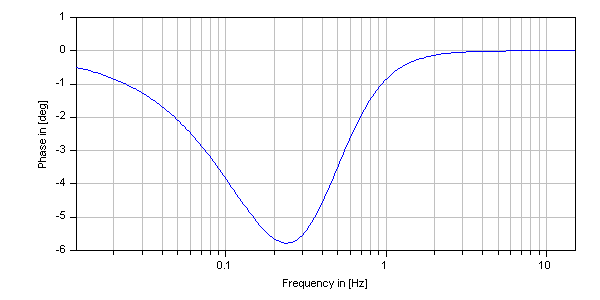
This function plots the bode-diagram of a transfer function corresponding to the behavior of the state space system from iu'th element of the input vector u to the iy'th element of the output vector y.
Example
  Modelica_LinearSystems2.StateSpace ss=Modelica_LinearSystems2.StateSpace(
    A=[-1.0,0.0,0.0; 0.0,-2.0,0.0; 0.0,0.0,-3.0],
    B=[0.0,1.0; 1.0,1.0; -1.0,0.0],
    C=[0.0,1.0,1.0; 1.0,1.0,1.0],
    D=[1.0,0.0; 0.0,1.0])

  Integer iu=1;
  Integer iy=1;

algorithm
   Modelica_LinearSystems2.StateSpace.Plot.plotBodeSISO(ss, iu, iy)
//  gives:
Inputs
| Type | Name | Default | Description |
|---|---|---|---|
| StateSpace | ss | State space system | |
| Integer | iu | 1 | Index of input |
| Integer | iy | 1 | Index of output |
| Integer | nPoints | 200 | Number of points |
| Boolean | autoRange | true | = true, if abszissa range is automatically determined |
| Modelica.Units.SI.Frequency | f_min | 0.1 | Minimum frequency value, if autoRange = false |
| Modelica.Units.SI.Frequency | f_max | 10 | Maximum frequency value, if autoRange = false |
| Boolean | magnitude | true | = true, to plot magnitude |
| Boolean | phase | true | = true, to plot phase |
| Real | tol | 1e-10 | Tolerance of reduction procedure, default tol = 1e-10 |
| Plot.Records.Diagram | defaultDiagram (from PartialPlotFunction) | Default diagram layout | |
| Plot.Records.Device | device (from PartialPlotFunction) | Modelica_LinearSystems2.Utilities.Plot.Records.Device() | Properties of device where figure is shown |
| Boolean | Hz | true | = true, to plot abszissa in [Hz], otherwise in [rad/s] (= 2*pi*Hz) |
| Boolean | dB | false | = true, to plot magnitude in [], otherwise in [dB] (=20*log10(value)) |
| Boolean | onFile | false | = true, if frequency response is stored on file as matrix [f,a,phi] |
| String | fileName | "frequencyResponse.mat" | If onFile=true, file on which the frequency response will be stored |
| String | matrixName | if Hz and not dB then "fHz_a_phiDeg" elseif Hz and dB then "fHz_adB_phiDeg" elseif not Hz and dB then "f_adB_phiDeg" else "f_a_phiDeg" | If onFile=true, Name of matrix on file |