modelCutForceAndTorque
Extends from ObsoleteModelica3.Mechanics.MultiBody.Interfaces.PartialCutForceSensor.
Information
The cut-force and cut-torque acting at the component to which frame_b is connected are determined and provided at the output signal connector load:
  load[1:3] = frame_a.f;
  load[4:6] = frame_a.t;
If parameter positiveSign = false, the negative cut-force and negative cut-torque is provided (= frame_b.f and frame_b.t). If frame_resolve is connected to another frame, then the cut-force and cut-torque are resolved in frame_resolve. If frame_resolve is not connected then the coordinate system in which the cut-force and cut-torque is resolved is defined by parameter resolveInFrame_a. If this parameter is true, then the cut-force and cut-torque is resolved in frame_a, otherwise it is resolved in the world frame.
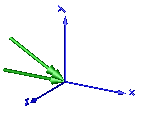
In the following figure the animation of a CutForceAndTorque sensor is shown. The dark blue coordinate system is frame_b, and the green arrows are the cut force and the cut torque, respectively, acting at frame_b and with negative sign at frame_a.
Parameters
| Type | Name | Default | Description |
|---|---|---|---|
| Boolean | animation | true | = true, if animation shall be enabled (show force and torque arrow) |
| Boolean | positiveSign | true | = true, if force and torque with positive sign is returned (= frame_a.f/.t), otherwise with negative sign (= frame_b.f/.t) |
| Boolean | resolveInFrame_a | true | = true, if force and torque are resolved in frame_a/frame_b, otherwise in the world frame (if connector frame_resolve is connected, the force/torque is resolved in frame_resolve) |
Components
| Type | Name | Default | Description |
|---|---|---|---|
| Modelica.Blocks.Interfaces.RealOutput[6] | load | Cut force and cut torque resolved in frame_a/frame_b or in frame_resolved, if connected | |
| Real | N_to_m | 1000 | Force arrow scaling (length = force/N_to_m) |
| Real | Nm_to_m | 1000 | Torque arrow scaling (length = torque/Nm_to_m) |
| SI.Diameter | forceDiameter | world.defaultArrowDiameter | Diameter of force arrow |
| SI.Diameter | torqueDiameter | forceDiameter | Diameter of torque arrow |
| Types.Color | forceColor | Modelica.Mechanics.MultiBody.Types.Defaults.ForceColor | Color of force arrow |
| Types.Color | torqueColor | Modelica.Mechanics.MultiBody.Types.Defaults.TorqueColor | Color of torque arrow |
| Types.SpecularCoefficient | specularCoefficient | world.defaultSpecularCoefficient | Reflection of ambient light (= 0: light is completely absorbed) |
| SI.Force[3] | force | Cut force resolved in frame_a/frame_b or in frame_resolved, if connected | |
| SI.Torque[3] | torque | Cut torque resolved in frame_a/frame_b or in frame_resolved, if connected |