 .BuildSysPro.IBPSA.BoundaryConditions.WeatherData.ReaderTMY3 .BuildSysPro.IBPSA.BoundaryConditions.WeatherData.ReaderTMY3
This component reads TMY3 weather data (Wilcox and Marion, 2008)
or user specified weather data. The Modelica built-in variable
time determines what row of the weather file is read.
The value of time is the number of seconds that have
passed since January 1st at midnight (00:00) in the local time
zone. The local time zone value, longitude and latitute are also
read from the weather data, such that the solar position
computations are consistent with the weather data.
The weather data format is the Typical Meteorological Year (TMY3) as obtained from the EnergyPlus web site at http://energyplus.net/weather. These data, which are in the EnergyPlus format, need to be converted as described below.
The following variables serve as output and are accessible via
weaBus:
| Name | Unit | Description |
|---|---|---|
HDifHor |
W/m2 | Horizontal diffuse solar radiation. |
HDifNor |
W/m2 | Direct normal radiation. |
HGloHor |
W/m2 | Horizontal global radiation. |
HHorIR |
W/m2 | Horizontal infrared irradiation. |
TBlaSky |
K | Output temperature. |
TDewPoi |
K | Dew point temperature. |
TDryBul |
K | Dry bulb temperature at ground level. |
TWetBul |
K | Wet bulb temperature. |
celHei |
m | Ceiling height. |
cloTim |
s | One-based day number in seconds. |
lat |
rad | Latitude of the location. |
lon |
rad | Longitude of the location. |
nOpa |
1 | Opaque sky cover [0, 1]. |
nTot |
1 | Total sky Cover [0, 1]. |
pAtm |
Pa | Atmospheric pressure. |
relHum |
1 | Relative humidity. |
solAlt |
rad | Altitude angle. |
solDec |
rad | Declination angle. |
solHouAng |
rad | Solar hour angle. |
solTim |
s | Solar time. |
solZen |
rad | Zenith angle. |
winDir |
rad | Wind direction. |
winSpe |
m/s | Wind speed. |
To add new weather data, proceed as follows:
epw
extension from http://energyplus.net/weather.IBPSA/Resources/weatherdata (or to
any directory for which you have write permission).cd IBPSA/Resources/weatherdata java -jar ../bin/ConvertWeatherData.jar inputFile.epwif inputFile contains space in the name:
java -jar ../bin/ConvertWeatherData.jar "inputFile .epw"This will generate the weather data file
inputFile.mos, which can be read by the model
IBPSA.BoundaryConditions.WeatherData.ReaderTMY3.The following location data are automatically read from the weather file:
lat,lon,
andtimZone.By default, the data bus contains the wet bulb temperature. This
introduces a nonlinear equation. However, we have not observed an
increase in computing time because of this equation. To disable the
computation of the wet bulb temperature, set
computeWetBulbTemperature=false.
This model has the option of using a constant value, using the data from the weather file, or using data from an input connector for the following variables:
By default, all data are obtained from the weather data file,
except for the atmospheric pressure, which is set to the parameter
pAtm=101325 Pascals.
The parameter *Sou configures the source of the
data. For the atmospheric pressure, temperatures, relative
humidity, wind speed and wind direction, the enumeration IBPSA.BoundaryConditions.Types.DataSource
is used as follows:
Parameter *Sou |
Data used to compute weather data. |
|---|---|
| File | Use data from file. |
| Parameter | Use value specified by the parameter. |
| Input | Use value from the input connector. |
Because global, diffuse and direct radiation are related to each
other, the parameter HSou is treated differently. It
is set to a value of the enumeration
IBPSA.BoundaryConditions.Types.RadiationDataSource, and allows
the following configurations:
Parameter HSou |
Data used to compute weather data. |
|---|---|
| File | Use data from file. |
| Input_HGloHor_HDifHor | Use global horizontal and diffuse horizontal radiation from input connector. |
| Input_HDirNor_HDifHor | Use direct normal and diffuse horizontal radiation from input connector. |
| Input_HDirNor_HGloHor | Use direct normal and global horizontal radiation from input connector. |
If weather data span a year, which is the default for TMY3 data,
or multiple years, then this model can be used for simulations that
span multiple years. The simulation start time needs to be set to
the clock time of the respective start time. For example, to start
at January 2 at 10am, set start time to t=(24+10)*3600
seconds. For this computation, the used date and time (here January
2, 10 am) must be expressed in the same time zone as the one that
is used to define the TMY3 file. This is usually the local (winter)
time zone. The parameter `timZon` represents the TMY3 file time
zone, expressed in seconds compared to UTC.
Moreover, weather data need not span a whole year, or it can span across New Year. In this case, the simulation cannot exceed the time of the weather data file. Otherwise, the simulation stops with an error.
As weather data have one entry at the start of the time interval, the end time of the weather data file is computed as the last time entry plus the average time increment of the file. For example, an hourly weather data file has 8760 entries, starting on January 1 at 0:00. The last entry in the file will be for December 31 at 23:00. As the time increment is 1 hour, the model assumes the weather file to end at December 31 at 23:00 plus 1 hour, e.g., at January 1 at 0:00.
In HVAC systems, when the fan is off, changes in atmospheric
pressure can cause small air flow rates in the duct system due to
change in pressure and hence in the mass of air that is stored in
air volumes (such as in fluid junctions or in the room model). This
may increase computing time. Therefore, the default value for the
atmospheric pressure is set to a constant. Furthermore, if the
initial pressure of air volumes are different from the atmospheric
pressure, then fast pressure transients can happen in the first few
seconds of the simulation. This can cause numerical problems for
the solver. To avoid this problem, set the atmospheric pressure to
the same value as the medium default pressure, which is typically
set to the parameter Medium.p_default. For medium
models for moist air and dry air, the default is
Medium.p_default=101325 Pascals.
Different units apply depending on whether data are obtained from a file, or from a parameter or an input connector:
USA_IL_Chicago-OHare.Intl.AP.725300_TMY3.mos), the
units must be the same as the original TMY3 file used by EnergyPlus
(e.g. USA_IL_Chicago-OHare.Intl.AP.725300_TMY3.epw).
The TMY3 data used by EnergyPlus are in both SI units and non-SI
units. If Resources/bin/ConvertWeatherData.jar is used
to convert the .epw file to an .mos file,
the units of the TMY3 data are preserved and the file can be
directly used by this data reader. The data reader will
automatically convert units to the SI units used by Modelica. For
example, the dry bulb temperature TDryBul in TMY3 is
in degree Celsius. The data reader will automatically convert the
data to Kelvin. The wind direction winDir in TMY3 is
degrees and will be automatically converted to radians.Pa for pressure, K for
temperature, W/m2 for solar radiations and
rad for wind direction.Hourly and subhourly timestamp are handled in a different way in
.epw files. From the EnergyPlus Auxiliary Programs
Document (v9.3.0, p. 63): In hourly data the minute field can be
00 or 60. In this case as mentioned in
the previous section, the weather data is reported at the hourly
value and the minute field has to be ignored, writing 1,
60 or 1, 00 is equivalent. If the minute field
is between 00 and 60, the file becomes
subhourly, in this case the timestamp corresponds to the minute
field in the considered hour. For example: 1, 30 is
equivalent to 00:30 and 3, 45 is equivalent to
02:45.
(Note the offset in the hour digit.)
The TMY3 weather data, as well as the EnergyPlus weather data,
start at 1:00 AM on January 1, and provide hourly data until
midnight on December 31. Thus, the first entry for temperatures,
humidity, wind speed etc. are values at 1:00 AM and not at
midnight. Furthermore, the TMY3 weather data files can have values
at midnight of December 31 that may be significantly different from
the values at 1:00 AM on January 1. Since annual simulations
require weather data that start at 0:00 on January 1, data need to
be provided for this hour. Due to the possibly large change in
weatherdata between 1:00 AM on January 1 and midnight at December
31, the weather data files in the IBPSA library do not use the data
entry from midnight at December 31 as the value for t=0.
Rather, the value from 1:00 AM on January 1 is duplicated and used
for 0:00 on January 1. To maintain a data record with 8760
hours, the weather data record from midnight at December 31 is
deleted. These changes in the weather data file are done in the
Java program
IBPSA/Resources/bin/ConvertWeatherData.jar that
converts EnergyPlus weather data file to Modelica weather data
files, and which is described above. The length of the weather data
is calculated as the end time stamp minus start time stamp plus
average increment, where the average increment is equal to the end
time stamp minus start time stamp divided by the number of rows
minus 1. This only works correctly for weather files with
equidistant time stamps.
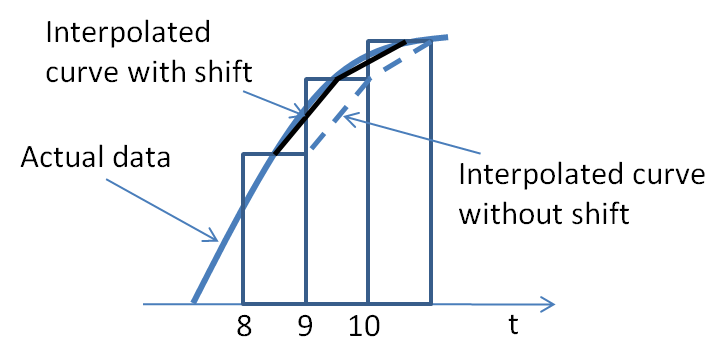
To read weather data from the TMY3 weather data file, there are two data readers in this model. One data reader obtains all data except solar radiation, and the other data reader reads only the solar radiation data, shifted by 30 minutes. The reason for this time shift is as follows: The TMY3 weather data file contains for solar radiation the "...radiation received on a horizontal surface during the 60-minute period ending at the timestamp." Thus, as the figure below shows, a more accurate interpolation is obtained if time is shifted by 30 minutes prior to reading the weather data.
time in the
documentation.getAbsolutePath, as this
causes in Dymola 2018FD01 the error "A call of loadResource with a
non-literal string remains in the generated code; it will not work
for an URI." when exporting
IBPSA.Fluid.FMI.ExportContainers.Examples.FMUs.ThermalZone as
an FMU. Instead, if the weather file is specified as a Modelica,
URI, syntax such as
Modelica.Utilities.Files.loadResource("modelica://BuildSysPro/IBPSA/Resources/weatherdata/USA_IL_Chicago-OHare.Intl.AP.725300_TMY3.mos")
should be used.absFilNam to avoid multiple calls to
IBPSA.BoundaryConditions.WeatherData.BaseClasses.getAbsolutePath.
This is for Buildings,
#506.radHorIR to HHorIR. This
is for #376.weaBus. This is for #376.cheTemBlaSky. This also allows to
graphically connect the black body sky temperature to the weather
bus, which is required in Dymola 2016 for the variable
weaBus.TBlaSky to appear in the graphical editor. This
is for #377.loadSelector for
MSL compliancy as reported by @tbeu at RWTH-EBC/AixLib#107connect(TBlaSkyCom.TBlaSky,
weaBus.TBlaSky) statement. This avoids a warning if
IBPSA.BoundaryConditions.SolarIrradiation.BaseClasses.Examples.SkyClearness
is translated in pedantic mode in Dymola 2016. This is for #266.connect(conHorRad.HOut,
cheHorRad.HIn);.Evaluate=true.HInfHor.file://, modelica://
and modelica://IBPSA are added in this order to search
for the weather file. This allows using the data reader without
having to specify an absolute path, as long as the
IBPSA library is on the MODELICAPATH.
This change was implemented in
IBPSA.BoundaryConditions.WeatherData.BaseClasses.getAbsolutePath
and improves this weather data reader.getAbsolutePath.computeWetBulbTemperature=false, the
computation of the wet bulb temperature can be removed. Revised
documentation.radHor to radHorIR and improved
the optional inputs for radiation data.HGloHor_in in its declaration,
because this gives an overdetermined system if the input connector
is used. Removed non-required assignments of attribute
displayUnit.pAtm_in_internal and made
propagation of parameter final.