
modelReaderTMY3
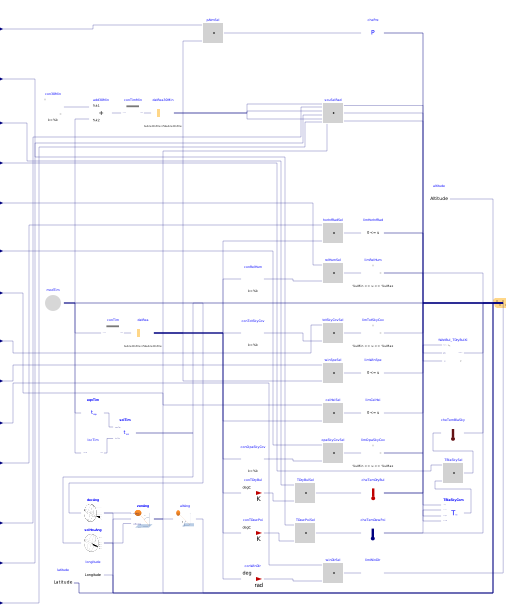
Information
This component reads TMY3 weather data (Wilcox and Marion, 2008) or user specified weather data.
The Modelica built-in variable time determines what row
of the weather file is read.
The value of time is the number of seconds
that have passed since January 1st at midnight (00:00) in the local time zone.
The local time zone value, longitude and latitute are also read from the weather data,
such that the solar position computations are consistent with the weather data.
The weather data format is the Typical Meteorological Year (TMY3) as obtained from the EnergyPlus web site at http://energyplus.net/weather. These data, which are in the EnergyPlus format, need to be converted as described below.
Output to weaBus
The following variables serve as output and are accessible via weaBus:
| Name | Unit | Description |
|---|---|---|
HDifHor
|
W/m2 | Horizontal diffuse solar radiation. |
HDifNor
|
W/m2 | Direct normal radiation. |
HGloHor
|
W/m2 | Horizontal global radiation. |
HHorIR
|
W/m2 | Horizontal infrared irradiation. |
TBlaSky
|
K | Output temperature. |
TDewPoi
|
K | Dew point temperature. |
TDryBul
|
K | Dry bulb temperature at ground level. |
TWetBul
|
K | Wet bulb temperature. |
celHei
|
m | Ceiling height. |
cloTim
|
s | One-based day number in seconds. |
lat
|
rad | Latitude of the location. |
lon
|
rad | Longitude of the location. |
nOpa
|
1 | Opaque sky cover [0, 1]. |
nTot
|
1 | Total sky Cover [0, 1]. |
pAtm
|
Pa | Atmospheric pressure. |
relHum
|
1 | Relative humidity. |
solAlt
|
rad | Altitude angle. |
solDec
|
rad | Declination angle. |
solHouAng
|
rad | Solar hour angle. |
solTim
|
s | Solar time. |
solZen
|
rad | Zenith angle. |
winDir
|
rad | Wind direction. |
winSpe
|
m/s | Wind speed. |
Using new weather data
To use new weather data, there are two supported ways:
-
You can use the Python tool AixWeather (https://github.com/RWTH-EBC/AixWeather), which is installable via
pipor accessible via a WebApp (https://aixweather.eonerc.rwth-aachen.de/). Here, conversion ofepw(EnergyPlus),dat(German Meteorological Service) or custom data to the desiredmosformat is supported. -
You can use a Python application to convert
epwtomosformat by following these steps:-
Download the weather data file with the
epwextension from http://energyplus.net/weather. -
Add the file to
Buildings/Resources/weatherdata(or to any directory for which you have write permission). -
On a console window, type
  cd Buildings/Resources/weatherdata
  python ../bin/convert_weather_data.py inputFile.epw
or if
inputFile.epwcontains space in the name:python ../bin/convert_weather_data.py "inputFile .epw"
This will generate the weather data file
inputFile.mos, which can be read by the model Buildings.BoundaryConditions.WeatherData.ReaderTMY3. To see the script options use the help argument:python ../bin/convert_weather_data.py -h
-
Location data that are read automatically from the weather data file
The following location data are automatically read from the weather file:
-
The latitude of the weather station,
lat, -
the longitude of the weather station,
lon, and -
the time zone relative to Greenwich Mean Time,
timZone.
Wet bulb temperature
By default, the data bus contains the wet bulb temperature.
This introduces a nonlinear equation.
However, we have not observed an increase in computing time because
of this equation.
To disable the computation of the wet bulb temperature, set
computeWetBulbTemperature=false.
Using constant or user-defined input signals for weather data
This model has the option of using a constant value, using the data from the weather file, or using data from an input connector for the following variables:
- The atmospheric pressure,
- the ceiling height,
- the total sky cover,
- the opaque sky cover,
- the dry bulb temperature,
- the dew point temperature,
- the sky black body temperature,
- the relative humidity,
- the wind direction,
- the wind speed,
- the global horizontal radiation, direct normal and diffuse horizontal radiation, and
- the infrared horizontal radiation.
By default, all data are obtained from the weather data file,
except for the atmospheric pressure, which is set to the
parameter pAtm=101325 Pascals.
The parameter *Sou configures the source of the data.
For the atmospheric pressure, temperatures, relative humidity, wind speed and wind direction,
the enumeration
Buildings.BoundaryConditions.Types.DataSource
is used as follows:
Parameter *Sou
|
Data used to compute weather data. |
|---|---|
| File | Use data from file. |
| Parameter | Use value specified by the parameter. |
| Input | Use value from the input connector. |
Because global, diffuse and direct radiation are related to each other, the parameter
HSou is treated differently.
It is set to a value of the enumeration
Buildings.BoundaryConditions.Types.RadiationDataSource,
and allows the following configurations:
Parameter HSou
|
Data used to compute weather data. |
|---|---|
| File | Use data from file. |
| Input_HGloHor_HDifHor | Use global horizontal and diffuse horizontal radiation from input connector. |
| Input_HDirNor_HDifHor | Use direct normal and diffuse horizontal radiation from input connector. |
| Input_HDirNor_HGloHor | Use direct normal and global horizontal radiation from input connector. |
Length of weather data and simulation period
If weather data span a year, which is the default for TMY3 data, or multiple years,
then this model can be used for simulations that span multiple years. The simulation
start time needs to be set to the clock time of the respective start time. For example,
to start at January 2 at 10am, set start time to t=(24+10)*3600 seconds.
For this computation, the used date and time (here January 2, 10 am) must be expressed in the same time zone
as the one that is used to define the TMY3 file. This is usually the local (winter) time zone.
The parameter `timZon` represents the TMY3 file time zone, expressed in seconds compared to UTC.
Moreover, weather data need not span a whole year, or it can span across New Year. In this case, the simulation cannot exceed the time of the weather data file. Otherwise, the simulation stops with an error.
As weather data have one entry at the start of the time interval, the end time of the weather data file is computed as the last time entry plus the average time increment of the file. For example, an hourly weather data file has 8760 entries, starting on January 1 at 0:00. The last entry in the file will be for December 31 at 23:00. As the time increment is 1 hour, the model assumes the weather file to end at December 31 at 23:00 plus 1 hour, e.g., at January 1 at 0:00.
Notes
-
In HVAC systems, when the fan is off, changes in atmospheric pressure can cause small air flow rates in the duct system due to change in pressure and hence in the mass of air that is stored in air volumes (such as in fluid junctions or in the room model). This may increase computing time. Therefore, the default value for the atmospheric pressure is set to a constant. Furthermore, if the initial pressure of air volumes are different from the atmospheric pressure, then fast pressure transients can happen in the first few seconds of the simulation. This can cause numerical problems for the solver. To avoid this problem, set the atmospheric pressure to the same value as the medium default pressure, which is typically set to the parameter
Medium.p_default. For medium models for moist air and dry air, the default isMedium.p_default=101325Pascals. -
Different units apply depending on whether data are obtained from a file, or from a parameter or an input connector:
-
When using TMY3 data from a file (e.g.
USA_IL_Chicago-OHare.Intl.AP.725300_TMY3.mos), the units must be the same as the original TMY3 file used by EnergyPlus (e.g.USA_IL_Chicago-OHare.Intl.AP.725300_TMY3.epw). The TMY3 data used by EnergyPlus are in both SI units and non-SI units. IfResources/bin/ConvertWeatherData.jaris used to convert the.epwfile to an.mosfile, the units of the TMY3 data are preserved and the file can be directly used by this data reader. The data reader will automatically convert units to the SI units used by Modelica. For example, the dry bulb temperatureTDryBulin TMY3 is in degree Celsius. The data reader will automatically convert the data to Kelvin. The wind directionwinDirin TMY3 is degrees and will be automatically converted to radians. -
When using data from a parameter or from an input connector,
the data must be in the SI units used by Modelica.
For instance, the unit must be
Pafor pressure,Kfor temperature,W/m2for solar radiations andradfor wind direction.
-
When using TMY3 data from a file (e.g.
-
Hourly and subhourly timestamp are handled in a different way in
.epwfiles. From the EnergyPlus Auxiliary Programs Document (v9.3.0, p. 63): In hourly data the minute field can be00or60. In this case as mentioned in the previous section, the weather data is reported at the hourly value and the minute field has to be ignored, writing1, 60or1, 00is equivalent. If the minute field is between00and60, the file becomes subhourly, in this case the timestamp corresponds to the minute field in the considered hour. For example:1, 30is equivalent to 00:30 and3, 45is equivalent to 02:45.
(Note the offset in the hour digit.) - The ReaderTMY3 should only be used with TMY3 data. It contains a time shift for solar radiation data that is explained below. This time shift needs to be removed if the user may want to use the ReaderTMY3 for other weather data types.
Implementation
Start and end data for annual weather data files
The TMY3 weather data, as well as the EnergyPlus weather data, start at 1:00 AM
on January 1, and provide hourly data until midnight on December 31.
Thus, the first entry for temperatures, humidity, wind speed etc. are values
at 1:00 AM and not at midnight. Furthermore, the TMY3 weather data files can have
values at midnight of December 31 that may be significantly different from the values
at 1:00 AM on January 1.
Since annual simulations require weather data that start at 0:00 on January 1,
data need to be provided for this hour. Due to the possibly large change in
weatherdata between 1:00 AM on January 1 and midnight at December 31,
the weather data files in the Buildings library do not use the data entry from
midnight at December 31 as the value for t=0. Rather, the
value from 1:00 AM on January 1 is duplicated and used for 0:00 on January 1.
To maintain a data record with 8760 hours, the weather data record from
midnight at December 31 is deleted.
These changes in the weather data file are done in the python script
Buildings/Resources/bin/convert_weather_data.py that converts
EnergyPlus weather data file to Modelica weather data files, and which is described
above.
The length of the weather data is calculated as the
end time stamp minus start time stamp plus average increment, where the
average increment is equal to the end time stamp minus start time stamp divided
by the number of rows minus 1.
This only works correctly for weather files with equidistant time stamps.
Time shift for solar radiation data
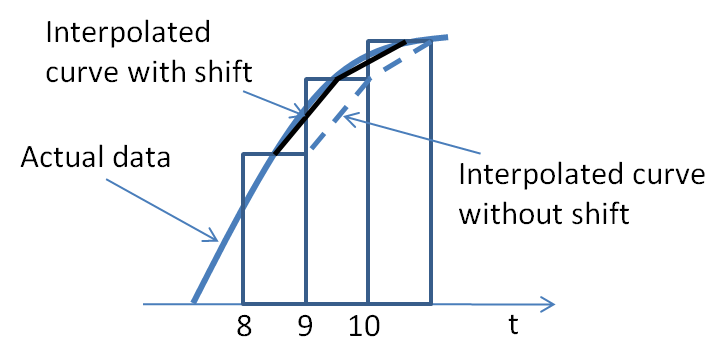
To read weather data from the TMY3 weather data file, there are two data readers in this model. One data reader obtains all data except solar radiation, and the other data reader reads only the solar radiation data, shifted by 30 minutes. The reason for this time shift is as follows: The TMY3 weather data file contains for solar radiation the "...radiation received on a horizontal surface during the 60-minute period ending at the timestamp." Thus, as the figure below shows, a more accurate interpolation is obtained if time is shifted by 30 minutes prior to reading the weather data.
References
- Wilcox S. and W. Marion. Users Manual for TMY3 Data Sets. Technical Report, NREL/TP-581-43156, revised May 2008.
Parameters
| Type | Name | Default | Description |
|---|---|---|---|
| String | filNam | "" | Name of weather data file |
| Boolean | computeWetBulbTemperature | true | If true, then this model computes the wet bulb temperature |
| Modelica.Units.SI.Angle | lon | Buildings.BoundaryConditions.WeatherData.BaseClasses.getLongitudeTMY3(filNam) | Longitude |
| Modelica.Units.SI.Angle | lat | Buildings.BoundaryConditions.WeatherData.BaseClasses.getLatitudeTMY3(filNam) | Latitude |
| Modelica.Units.SI.Time | timZon | Buildings.BoundaryConditions.WeatherData.BaseClasses.getTimeZoneTMY3(filNam) | Time zone |
| Modelica.Units.SI.Length | alt | Buildings.BoundaryConditions.WeatherData.BaseClasses.getAltitudeLocationTMY3(filNam) | Location altitude above sea level |
| Data source | |||
| Buildings.BoundaryConditions.Types.DataSource | pAtmSou | Buildings.BoundaryConditions.Types.DataSource.Parameter | Atmospheric pressure |
| Modelica.Units.SI.Pressure | pAtm | 101325 | Atmospheric pressure (used if pAtmSou=Parameter) |
| Buildings.BoundaryConditions.Types.DataSource | TDryBulSou | Buildings.BoundaryConditions.Types.DataSource.File | Dry bulb temperature |
| Modelica.Units.SI.Temperature | TDryBul | 293.15 | Dry bulb temperature (used if TDryBul=Parameter) |
| Buildings.BoundaryConditions.Types.DataSource | TDewPoiSou | Buildings.BoundaryConditions.Types.DataSource.File | Dew point temperature |
| Modelica.Units.SI.Temperature | TDewPoi | 283.15 | Dew point temperature (used if TDewPoi=Parameter) |
| Buildings.BoundaryConditions.Types.DataSource | TBlaSkySou | Buildings.BoundaryConditions.Types.DataSource.File | Black-body sky temperature |
| Modelica.Units.SI.Temperature | TBlaSky | 273.15 | Black-body sky temperature (used if TBlaSkySou=Parameter) |
| Buildings.BoundaryConditions.Types.DataSource | relHumSou | Buildings.BoundaryConditions.Types.DataSource.File | Relative humidity |
| Real | relHum | 0.5 | Relative humidity (used if relHum=Parameter) |
| Buildings.BoundaryConditions.Types.DataSource | winSpeSou | Buildings.BoundaryConditions.Types.DataSource.File | Wind speed |
| Modelica.Units.SI.Velocity | winSpe | 1 | Wind speed (used if winSpe=Parameter) |
| Buildings.BoundaryConditions.Types.DataSource | winDirSou | Buildings.BoundaryConditions.Types.DataSource.File | Wind direction |
| Modelica.Units.SI.Angle | winDir | 1.0 | Wind direction (used if winDir=Parameter) |
| Buildings.BoundaryConditions.Types.DataSource | HInfHorSou | Buildings.BoundaryConditions.Types.DataSource.File | Infrared horizontal radiation |
| Modelica.Units.SI.HeatFlux | HInfHor | 0.0 | Infrared horizontal radiation (used if HInfHorSou=Parameter) |
| Buildings.BoundaryConditions.Types.RadiationDataSource | HSou | Buildings.BoundaryConditions.Types.RadiationDataSource.File | Global, diffuse, and direct normal radiation |
| Buildings.BoundaryConditions.Types.DataSource | ceiHeiSou | Buildings.BoundaryConditions.Types.DataSource.File | Ceiling height |
| Real | ceiHei | 20000 | Ceiling height (used if ceiHei=Parameter) |
| Buildings.BoundaryConditions.Types.DataSource | totSkyCovSou | Buildings.BoundaryConditions.Types.DataSource.File | Total sky cover |
| Real | totSkyCov | 0.5 | Total sky cover (used if totSkyCov=Parameter). Use 0 <= totSkyCov <= 1 |
| Buildings.BoundaryConditions.Types.DataSource | opaSkyCovSou | Buildings.BoundaryConditions.Types.DataSource.File | Opaque sky cover |
| Real | opaSkyCov | 0.5 | Opaque sky cover (used if opaSkyCov=Parameter). Use 0 <= opaSkyCov <= 1 |
| Advanced › Sky temperature | |||
| Buildings.BoundaryConditions.Types.SkyTemperatureCalculation | calTSky | Buildings.BoundaryConditions.Types.SkyTemperatureCalculation.TemperaturesAndSkyCover | Model choice for black-body sky temperature calculation |
Connectors
| Type | Name | Default | Description |
|---|---|---|---|
| Bus | weaBus | Weather data bus | |
| Modelica.Blocks.Interfaces.RealInput | pAtm_in | Input pressure | |
| Modelica.Blocks.Interfaces.RealInput | TDryBul_in | Input dry bulb temperature | |
| Modelica.Blocks.Interfaces.RealInput | TDewPoi_in | Input dew point temperature | |
| Modelica.Blocks.Interfaces.RealInput | TBlaSky_in | Black-body sky temperature | |
| Modelica.Blocks.Interfaces.RealInput | relHum_in | Input relative humidity | |
| Modelica.Blocks.Interfaces.RealInput | winSpe_in | Input wind speed | |
| Modelica.Blocks.Interfaces.RealInput | winDir_in | Input wind direction | |
| Modelica.Blocks.Interfaces.RealInput | HInfHor_in | Input infrared horizontal radiation | |
| Modelica.Blocks.Interfaces.RealInput | HGloHor_in | Input global horizontal radiation | |
| Modelica.Blocks.Interfaces.RealInput | HDifHor_in | Input diffuse horizontal radiation | |
| Modelica.Blocks.Interfaces.RealInput | HDirNor_in | Input direct normal radiation | |
| Modelica.Blocks.Interfaces.RealInput | ceiHei_in | Input ceiling height | |
| Modelica.Blocks.Interfaces.RealInput | totSkyCov_in | Input total sky cover | |
| Modelica.Blocks.Interfaces.RealInput | opaSkyCov_in | Input opaque sky cover |
Contents
| Name | Description |
|---|---|
 Latitudeprotected Latitudeprotected | Generate constant signal of type Real |
 Longitudeprotected Longitudeprotected | Generate constant signal of type Real |
 Altitudeprotected Altitudeprotected | Generate constant signal of type Real |
Revisions
-
April 8, 2026, by Jianjun Hu:
Changed the class type from block to model.
This is for IBPSA, #2091. -
April 7, 2026, by Ettore Zanetti:
Update documentation on weather script.
This is for IBPSA, #2068. -
May 28, 2025, by Fabian Wuellhorst:
Added information on AixWeather to documentation.
This is for IBPSA, #2017. -
September 6, 2021, by Ettore Zanetti:
Changed alt and lat to real inputs.
This is for IBPSA, #1477. -
May 2, 2021, by Ettore Zanetti:
Added altitude to parameters.
This is for IBPSA, #1477. -
October 4, 2020, by Ettore Zanetti:
Updated documentation for Java weather file generator.
This is for #1396. -
August 20, 2019, by Filip Jorissen:
Better clarified the meaning oftimein the documentation.
This is for #1192. -
March 5, 2019, by Michael Wetter:
Updated documentation.
This is for #842. -
September 20, 2018, by Michael Wetter:
Corrected documentation.
This is for #1022. -
December 4, 2017, by Michael Wetter:
Removed function call togetAbsolutePath, as this causes in Dymola 2018FD01 the error "A call of loadResource with a non-literal string remains in the generated code; it will not work for an URI." when exporting Buildings.Fluid.FMI.ExportContainers.Examples.FMUs.ThermalZone as an FMU. Instead, if the weather file is specified as a Modelica, URI, syntax such asModelica.Utilities.Files.loadResource("resources/Buildings/Resources/weatherdata/USA_IL_Chicago-OHare.Intl.AP.725300_TMY3.mos")should be used.
This is for #867. -
February 18, 2017, by Filip Jorissen:
Infrared radiation on horizontal surface is now delayed by 30 minutes such that the results in TBlaSky are consistent. This is for #648. -
December 06, 2016, by Thierry S. Nouidui:
Constrained the direct normal radiation to not be bigger than the solar constant when using global and diffuse solar radiation data provided via the inputs connectors. This is for #608. -
April 21, 2016, by Michael Wetter:
IntroducedabsFilNamto avoid multiple calls to Buildings.BoundaryConditions.WeatherData.BaseClasses.getAbsolutePath. This is for Buildings, #506. -
January 6, 2016, by Moritz Lauster:
Changed outputradHorIRtoHHorIR. This is for #376. -
January 4, 2016, by Moritz Lauster:
Added a table in documentation with output variables accessible viaweaBus. This is for #376. -
December 15, 2015, by Michael Wetter:
Added the blockcheTemBlaSky. This also allows to graphically connect the black body sky temperature to the weather bus, which is required in Dymola 2016 for the variableweaBus.TBlaSkyto appear in the graphical editor. This is for #377. -
September 24, 2015, by Marcus Fuchs:
Replace Dymola specific annotation byloadSelectorfor MSL compliancy as reported by @tbeu at RWTH-EBC/AixLib#107 -
June 6, 2015, by Michael Wetter:
Removed redundant but consistentconnect(TBlaSkyCom.TBlaSky, weaBus.TBlaSky)statement. This avoids a warning if Buildings.BoundaryConditions.SolarIrradiation.BaseClasses.Examples.SkyClearness is translated in pedantic mode in Dymola 2016. This is for #266. -
March 26, 2015, by Michael Wetter:
Added option to obtain the black body sky temperature from a parameter or an input signal. -
October 17, 2014, by Michael Wetter:
Corrected error that led the total and opaque sky cover to be ten times too low if its value was obtained from the parameter or the input connector. For the standard configuration in which the sky cover is obtained from the weather data file, the model was correct. This error only affected the other two possible configurations. -
September 12, 2014, by Michael Wetter:
Removed redundant connectionconnect(conHorRad.HOut, cheHorRad.HIn);. -
May 30, 2014, by Michael Wetter:
Removed undesirable annotationEvaluate=true. -
May 5, 2013, by Thierry S. Nouidui:
Added the option to use a constant, an input signal or the weather file as the source for the ceiling height, the total sky cover, the opaque sky cover, the dew point temperature, and the infrared horizontal radiationHInfHor. -
October 8, 2013, by Michael Wetter:
Improved the algorithm that determines the absolute path of the file. Now weather files are searched in the path specified, and if not found, the urlsfile://,modelica://andmodelica://Buildingsare added in this order to search for the weather file. This allows using the data reader without having to specify an absolute path, as long as theBuildingslibrary is on theMODELICAPATH. This change was implemented in Buildings.BoundaryConditions.WeatherData.BaseClasses.getAbsolutePath and improves this weather data reader. -
May 2, 2013, by Michael Wetter:
Added function call togetAbsolutePath. -
October 16, 2012, by Michael Wetter:
Added computation of the wet bulb temperature. Computing the wet bulb temperature introduces a nonlinear equation. As we have not observed an increase in computing time because of computing the wet bulb temperature, it is computed by default. By setting the parametercomputeWetBulbTemperature=false, the computation of the wet bulb temperature can be removed. Revised documentation. -
August 11, 2012, by Wangda Zuo:
RenamedradHortoradHorIRand improved the optional inputs for radiation data. -
July 24, 2012, by Wangda Zuo:
Corrected the notes of SI unit requirements for input files. -
July 13, 2012, by Michael Wetter:
Removed assignment ofHGloHor_inin its declaration, because this gives an overdetermined system if the input connector is used. Removed non-required assignments of attributedisplayUnit. -
February 25, 2012, by Michael Wetter:
Added subbus for solar position, which is needed by irradition and shading model. -
November 29, 2011, by Michael Wetter:
Fixed wrong display unit forpAtm_in_internaland made propagation of parameter final. -
October 27, 2011, by Wangda Zuo:
-
Added optional connectors for dry bulb temperature, relative humidity, wind speed, wind direction, global horizontal radiation, diffuse horizontal radiation.
- Separate the unit conversion for TMY3 data and data validity check.
-
Added optional connectors for dry bulb temperature, relative humidity, wind speed, wind direction, global horizontal radiation, diffuse horizontal radiation.
-
October 3, 2011, by Michael Wetter:
Propagated value for sky temperature calculation to make it accessible as a parameter. -
July 20, 2011, by Michael Wetter:
Added the option to use a constant, an input signal or the weather file as the source for the atmospheric pressure. -
March 15, 2011, by Wangda Zuo:
Delete the wet bulb temperature since it may cause numerical problem. -
March 7, 2011, by Wangda Zuo:
Added wet bulb temperature. Changed reader to read only needed columns. Added explanation for 30 minutes shift for radiation data. -
March 5, 2011, by Michael Wetter:
Changed implementation to obtain longitude and time zone directly from weather file. -
June 25, 2010, by Wangda Zuo:
First implementation.