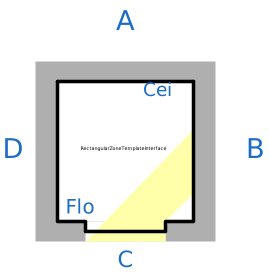
modelRectangularZoneTemplateInterface
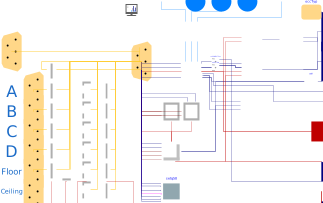
Extends from IDEAS.Buildings.Components.Interfaces.PartialZone (Building zone model).
Information
This model can be used to set up zones with a rectangular geometry more quickly. This template consists of a zone, four walls, a horizontal roof and a floor and five optional windows. Additional surfaces may also be connected through external bus connector. For the documentation of the zone parameters, see the documentation of Zone.
Main equations
This model incorporates IDEAS components such as IDEAS.Buildings.Components.OuterWall and reproduces the same results as a model that would be constructed without the use of this template.
Assumption and limitations
This model assumes that the zone has a rectangular
geometry with width w, length l
and height h.
All walls are vertical and perpendicular to each other and both the roof and
the floor are horizontal.
The surface area of each wall is calculated by default using
the parameters h, w and l. If you want to split a wall
and add external walls using the external bus connector, use the overwrite
length parameters lA, lB, lC, lD from the Face tabs
such that the surface area of the wall is correct. Also the ceiling or roof
surface area can be overwritten using the parameter ACei
from the Ceiling tab.
This way the user can overwrite the default ceiling surface area,
e.g. to better approximate an inclinated roof.
Be also aware that the model
slabOnGround has a parameter PWall which specifies the
perimeter of slab on ground. The model cannot detect external walls connected
using the external bus connector. When splitting outer walls by using the external bus connector
you should update this parameter
manually using the parameter PWall from the Advanced tab.
Typical use and important parameters
Parameters width w, length l
and height h need to be defined
and are used to compute the dimensions of each of the surfaces.
Parameter aziA represents the azimuth angle
of surface A (see icon). Other surfaces are rotated (clockwise) by multiples
of ninety degrees with respect to aziA.
Parameter nSurfExt may be used
to connect additional surfaces to the template.
When doing this, you may need to change the surface areas of
the surfaces in the template as these are not updated automatically.
Seven parameter tabs allow to specify further parameters
that are specific for each of the seven surfaces: six surfaces
for the walls, floor and ceiling and one for an internal wall
contained within the zone.
For each surface the surface type may be specified
using parameters bouTyp*.
The construction type should be defined
using conTyp*.
Parameter hasWin* may be used
for all orientations except for the floor to add
a window.
In this case the window surface area, shading and glazing
types need to be provided.
For non-default shading a record needs to be created that specifies
the shading properties.
The surface area of the window is deducted from the surface area
of the wall such that the total surface areas add up.
The zone template also has a heat port for embedded heat gains
in the floor. This can be used when the floor has a floor heating
system or a concrete core activation system. Set then
hasEmb from the tab Floor to true
to get the gaiEmb heat port on the zone template.
Notice that the zone template does not have a heat port for embedded
gains in the ceiling. To model concrete core activation in the ceiling,
use an external surface.
Options
Advanced options are found under the Advanced
parameter tab.
The model may also be adapted further by
overriding the default parameter assignments in the template.
You can also use this model for non-rectangular zones by, for example,
using the None type for a wall and by adding additional walls
corresponding to a different geometry through
the external bus connector.
This model however then does not guarantee that all parameters are consistent.
Therefore, some internal parameters of this model will need to be
updated manually.
In the parameter group Windows, you can redeclare the window.
This is useful when using a window model that has a pre-configured surface area,
glazing type, frame fraction and shading.
The parameters
azi=aziA,
inc=IDEAS.Types.Tilt.Wall,
T_start=T_start,
linIntCon_a=linIntCon,
dT_nominal_a=dT_nominal_win,
linExtCon=linExtCon,
windowDynamicsType=windowDynamicsType,
linExtRad=linExtRadWin,
nWin=nWinA,
are still computed from the zone model parameters but, the
other windows parameters are those configured in the
used window model, including the window surface area.
Dynamics
This model contains wall dynamics
and a state for the zone air temperature.
The zone temperature may be set to steady state using
parameter energyDynamicsAir, which should
in general not be done.
The mass dynamics of the air volume
may be set to steady state by overriding the default parameter
assignment in the airModel submodel.
This removes small time constants
when the zone model is connected to an air flow circuit.
Shading
In order to choose the shading of the glazing, instead of selecting one shading type from the dropdown menu, click on the button right of the dropdown menu (edit). A menu will appear where the type of shading and corresponding parameters have to be defined. Alternatively, the shading template can be extended.
Validation
This implementation is compared with a manual implementation in IDEAS.Buildings.Validation.Tests.ZoneTemplateVerification2. This gives identical results.
Example
An example of how this template may be used can be found in IDEAS.Examples.PPD12.
Implementation
Shading types need to be declared using a record instead of by redeclaring the shading components. This is a workaround because redeclared components cannot be propagated.
Parameters
| Type | Name | Default | Description |
|---|---|---|---|
| Integer | nSurf (from ZoneInterface) | Number of surfaces adjacent to and heat exchanging with the zone | |
| Integer | nPorts (from ZoneInterface) | 2 | Number of ports for ventilation connections |
| Real | n50_computed (from PartialZone) | n50_int | Computed n50 value |
| Modelica.Fluid.Types.Dynamics | energyDynamicsAir (from PartialZone) | Modelica.Fluid.Types.Dynamics.FixedInitial | Type of energy balance for air model: dynamic (3 initialization options) or steady state |
| Modelica.Units.SI.Power | QInf_design (from PartialZone) | 1012*1.204*V/3600*n50_int/n50toAch*(TZon_design - sim.Tdes) | Design heat losses from infiltration at reference outdoor temperature |
| Modelica.Units.SI.Power | QRH_design (from PartialZone) | A*fRH | Additional power required to compensate for the effects of intermittent heating |
| Modelica.Units.SI.Power | Q_design (from PartialZone) | Total design heat losses for the zone (including transmission, infiltration, and reheating; excluding ventilation) | |
| IDEAS.Buildings.Components.OccupancyType.OfficeWork | occTyp (from PartialZone) | ||
| IDEAS.Buildings.Components.RoomType.Generic | rooTyp (from PartialZone) | ||
| IDEAS.Buildings.Components.LightingType.None | ligTyp (from PartialZone) | ||
| Integer | nSurfExt | 0 | Number of additional connected external surfaces |
| Integer | aziOpt | 5 | Azimuth angle option from simInfoManager, or custom using aziA |
| Modelica.Units.SI.Angle | aziA | sim.aziOpts[aziOpt] | Azimuth angle of face A |
| Modelica.Units.SI.Length | l | Horizontal length of faces A and C. This parameter can be overwritten per surface | |
| Modelica.Units.SI.Length | w | Horizontal length of faces B and D. This parameter can be overwritten per surface | |
| Modelica.Units.SI.Length | h | Height between top of floor and bottom of ceiling | |
| IDEAS.Buildings.Data.Constructions.CavityWall | conTypA | ||
| IDEAS.Buildings.Data.Constructions.CavityWall | conTypB | ||
| IDEAS.Buildings.Data.Constructions.CavityWall | conTypC | ||
| IDEAS.Buildings.Data.Constructions.CavityWall | conTypD | ||
| IDEAS.Buildings.Data.Constructions.CavityWall | conTypCei | ||
| IDEAS.Buildings.Data.Constructions.CavityWall | conTypFlo | ||
| IDEAS.Buildings.Data.Constructions.CavityWall | conTypInt | ||
| IDEAS.Buildings.Components.Shading.Interfaces.ShadingProperties | shaTypA | ||
| IDEAS.Buildings.Components.Shading.Interfaces.ShadingProperties | shaTypB | ||
| IDEAS.Buildings.Components.Shading.Interfaces.ShadingProperties | shaTypC | ||
| IDEAS.Buildings.Components.Shading.Interfaces.ShadingProperties | shaTypD | ||
| IDEAS.Buildings.Components.Shading.Interfaces.ShadingProperties | shaTypCei | ||
| IDEAS.Buildings.Data.Frames.None | fraTypA | ||
| IDEAS.Buildings.Data.Frames.None | fraTypB | ||
| IDEAS.Buildings.Data.Frames.None | fraTypC | ||
| IDEAS.Buildings.Data.Frames.None | fraTypD | ||
| IDEAS.Buildings.Data.Frames.None | fraTypCei | ||
| Modelica.Units.SI.Angle | aziB | aziAInt + Modelica.Constants.pi/2 | Azimuth angle of face B |
| Modelica.Units.SI.Angle | aziC | aziAInt + Modelica.Constants.pi | Azimuth angle of face C |
| Modelica.Units.SI.Angle | aziD | aziAInt + 3*Modelica.Constants.pi/2 | Azimuth angle of face D |
| Building physics | |||
| Modelica.Units.SI.Volume | V (from ZoneInterface) | Total zone air volume | |
| Modelica.Units.SI.Length | hZone (from ZoneInterface) | 2.8 | Zone height: distance between floor and ceiling |
| Modelica.Units.SI.Length | hFloor (from ZoneInterface) | 0 | Absolute height of zone floor |
| Modelica.Units.SI.Area | A (from ZoneInterface) | V/hZone | Total conditioned floor area |
| Advanced › Occupants | |||
| Boolean | useOccNumInput (from ZoneInterface) | =false, to remove icon of yOcc | |
| Advanced › Sources | |||
| Boolean | useWatFlowInput (from ZoneInterface) | false | =true, to enable an input for injecting water vapor into a zone |
| Boolean | useCFlowInput (from ZoneInterface) | false | =true, to enable an input for injecting CO2 into a zone |
| Advanced › Lighting | |||
| Boolean | useLigCtrInput (from ZoneInterface) | =false, to remove icon of lightCtrl | |
| Airflow › Air model | |||
| Modelica.Units.SI.MassFlowRate | m_flow_nominal (from ZoneInterface) | V*1.2*2/3600 | Nominal flow rate of the air flow system fluid ports |
| Boolean | allowFlowReversal (from PartialZone) | true | = true to allow flow reversal in zone, false restricts to design direction (port_a -> port_b). |
| Airflow › Airtightness | |||
| Boolean | use_custom_n50 (from PartialZone) | sim.interZonalAirFlowType == IDEAS.BoundaryConditions.Types.InterZonalAirFlow.None and not sim.unify_n50 | if true, a custom n50 value is used instead of a globally computed n50 value |
| Real | n50 (from PartialZone) | sim.n50 | n50 value for this zone |
| Real | n50toAch (from PartialZone) | 20 | Conversion fractor from n50 to Air Change Rate |
| Advanced › Air model | |||
| Real | mSenFac (from PartialZone) | 5 | Correction factor for thermal capacity of zone air. |
| Advanced › Radiative heat exchange | |||
| Boolean | linIntRad (from PartialZone) | sim.linIntRad | Linearized computation of long wave radiation |
| Boolean | calculateViewFactor (from PartialZone) | false | Explicit calculation of view factors: works well only for rectangular zones! |
| Modelica.Units.SI.Temperature | Tzone_nom (from PartialZone) | 295.15 | Nominal zone temperature, used for linearising radiative heat exchange |
| Modelica.Units.SI.TemperatureDifference | dT_nom (from PartialZone) | -2 | Nominal temperature difference between zone walls, used for linearising radiative heat exchange |
| Boolean | simVieFac (from PartialZone) | false | Simplify view factor computation |
| Boolean | ignAss (from PartialZone) | false | Ignore asserts to simulate non-physical unit test models |
| Boolean | linExtRad | sim.linExtRad | = true, if exterior radiative heat transfer for walls should be linearised |
| Boolean | linExtRadWin | sim.linExtRadWin | = true, if exterior radiative heat transfer for windows should be linearised |
| Advanced › Design heat load | |||
| Modelica.Units.SI.Temperature | TZon_design (from PartialZone) | 294.15 | Reference zone temperature for calculation of design heat load |
| Real | fRH (from PartialZone) | 11 | Reheat factor for calculation of design heat load, (EN 12831, table D.10 Annex D) |
| Initialization | |||
| Medium.Temperature | T_start (from PartialZone) | Medium.T_default | Start value of temperature |
| Face A › Construction details | |||
| IDEAS.Buildings.Components.Interfaces.BoundaryType | bouTypA | Modelled boundary for face A of the zone | |
| Integer | nExtA | 1 | Number of external surfaces connected to face A |
| Face B › Construction details | |||
| IDEAS.Buildings.Components.Interfaces.BoundaryType | bouTypB | Modelled boundary for face B of the zone | |
| Integer | nExtB | 1 | Number of external surfaces connected to face B |
| Face C › Construction details | |||
| IDEAS.Buildings.Components.Interfaces.BoundaryType | bouTypC | Modelled boundary for face C of the zone | |
| Integer | nExtC | 1 | Number of external surfaces connected to face C |
| Face D › Construction details | |||
| IDEAS.Buildings.Components.Interfaces.BoundaryType | bouTypD | Modelled boundary for face D of the zone | |
| Integer | nExtD | 1 | Number of external surfaces connected to face D |
| Floor › Construction details | |||
| IDEAS.Buildings.Components.Interfaces.BoundaryType | bouTypFlo | Modelled boundary for the zone floor | |
| Integer | nExtFlo | 1 | Number of external surfaces connected to floor |
| Ceiling › Construction details | |||
| IDEAS.Buildings.Components.Interfaces.BoundaryType | bouTypCei | Modelled boundary for the zone ceiling | |
| Integer | nExtCei | 1 | Number of external surfaces connected to ceiling |
| Face A › Window details | |||
| Boolean | hasWinA | false | Modelling window for face A if true |
| Modelica.Units.SI.Area | A_winA | 0 | Surface area of window of face A |
| Modelica.Units.SI.Length | h_winA | max(0.1, sqrt(A_winA)) | Window A height, including frame |
| Real | fracA | 0.15 | Area fraction of the window frame of face A |
| Real | nWinA | 1 | Scaling factor to model nWinA identical windows in facade A |
| Face B › Window details | |||
| Boolean | hasWinB | false | Modelling window for face B if true |
| Modelica.Units.SI.Area | A_winB | 0 | Surface area of window of face B |
| Modelica.Units.SI.Length | h_winB | max(0.1, sqrt(A_winB)) | Window B height, including frame |
| Real | fracB | 0.15 | Area fraction of the window frame of face B |
| Real | nWinB | 1 | Scaling factor to model nWinB identical windows in facade B |
| Face C › Window details | |||
| Boolean | hasWinC | false | Modelling window for face C if true |
| Modelica.Units.SI.Area | A_winC | 0 | Surface area of window of face C |
| Modelica.Units.SI.Length | h_winC | max(0.1, sqrt(A_winC)) | Window C height, including frame |
| Real | fracC | 0.15 | Area fraction of the window frame of face C |
| Real | nWinC | 1 | Scaling factor to model nWinC identical windows in facade C |
| Face D › Window details | |||
| Boolean | hasWinD | false | Modelling window for face D if true |
| Modelica.Units.SI.Area | A_winD | 0 | Surface area of window of face D |
| Modelica.Units.SI.Length | h_winD | max(0.1, sqrt(A_winD)) | Window D height, including frame |
| Real | fracD | 0.15 | Area fraction of the window frame of face D |
| Real | nWinD | 1 | Scaling factor to model nWinD identical windows in facade D |
| Ceiling › Window details | |||
| Boolean | hasWinCei | false | Modelling window for ceiling if true |
| Modelica.Units.SI.Area | A_winCei | 0 | Surface area of window of ceiling |
| Modelica.Units.SI.Length | h_winCei | max(0.1, sqrt(A_winCei)) | Ceiling window height, including frame |
| Real | fracCei | 0.15 | Area fraction of the window frame of the ceiling |
| Real | nWinCei | 1 | Scaling factor to model nWinCei identical windows in the ceiling |
| Internal wall | |||
| Boolean | hasInt | false | If true, the zone contains an internal wall with both faces connected to the zone |
| Face A › Overwrite | |||
| Modelica.Units.SI.Length | lA | l | Horizontal length of face A |
| Face B › Overwrite | |||
| Modelica.Units.SI.Length | lB | w | Horizontal length of face B |
| Face C › Overwrite | |||
| Modelica.Units.SI.Length | lC | l | Horizontal length of face C |
| Face D › Overwrite | |||
| Modelica.Units.SI.Length | lD | w | Horizontal length of face D |
| Internal wall › Construction details | |||
| Modelica.Units.SI.Length | lInt | lA | Horizontal length of internal wall contained within the zone |
| Advanced › Overwrite | |||
| Modelica.Units.SI.Area | AZone | w*l | Parameter to overwrite the zone surface area |
| Ceiling › Overwrite | |||
| Modelica.Units.SI.Area | ACei | w*l | Surface of roof or ceiling (including potential windows) |
| Advanced › Convective heat exchange | |||
| Boolean | linIntCon | sim.linIntCon | = true, if convective heat transfer should be linearised |
| Boolean | linExtCon | sim.linExtCon | = true, if exterior convective heat transfer should be linearised (uses average wind speed) |
| Advanced › Windows | |||
| Interfaces.WindowDynamicsType | windowDynamicsType | IDEAS.Buildings.Components.Interfaces.WindowDynamicsType.Two | Type of dynamics for glazings and frames: using zero, one combined or two states |
| Advanced › Convective heat transfer | |||
| Modelica.Units.SI.TemperatureDifference | dT_nominal_win | -3 | Nominal temperature difference used for linearisation, negative temperatures indicate the solid is colder |
| Modelica.Units.SI.TemperatureDifference | dT_nominal_bou | -1 | Nominal temperature difference for boundary walls, used for linearisation, negative temperatures indicate the solid is colder |
| Modelica.Units.SI.TemperatureDifference | dT_nominal_out | -3 | Nominal temperature difference for outer walls, used for linearisation, negative temperatures indicate the solid is colder |
| Modelica.Units.SI.TemperatureDifference | dT_nominal_sla | -3 | Nominal temperature difference of slab on ground, used for linearisation, negative temperatures indicate the solid is colder |
| Modelica.Units.SI.TemperatureDifference | dT_nominal_intA | 1 | Nominal temperature difference between zone air and interior walls, used for linearisation |
| Modelica.Units.SI.TemperatureDifference | dT_nominal_intB | 1 | Nominal temperature difference between interior walls exterior connection, used for linearisation |
| Floor › Slab on ground | |||
| Modelica.Units.SI.Temperature | TeAvg | 273.15 + 10.8 | Annual average outdoor temperature |
| Modelica.Units.SI.Temperature | TiAvg | 273.15 + 22 | Annual average indoor temperature |
| Modelica.Units.SI.TemperatureDifference | dTeAvg | 4 | Amplitude of variation of monthly average outdoor temperature |
| Modelica.Units.SI.TemperatureDifference | dTiAvg | 2 | Amplitude of variation of monthly average indoor temperature |
| Modelica.Units.SI.Temperature[3] | T_start_gro | fill(TeAvg, 3) | Initial temperatures of the ground layers (with first value = deepest layer and last value = shallowest layer |
| Face A › Cavity or open door | |||
| Boolean | hasCavityA | false | =true, to model open door or cavity in internal wall |
| Modelica.Units.SI.Length | hA | 2 | Height of (rectangular) cavity in internal wall |
| Modelica.Units.SI.Length | wA | 1 | Width of (rectangular) cavity in internal wall |
| Face B › Cavity or open door | |||
| Boolean | hasCavityB | false | =true, to model open door or cavity in internal wall |
| Modelica.Units.SI.Length | hB | 2 | Height of (rectangular) cavity in internal wall |
| Modelica.Units.SI.Length | wB | 1 | Width of (rectangular) cavity in internal wall |
| Face C › Cavity or open door | |||
| Boolean | hasCavityC | false | =true, to model open door or cavity in internal wall |
| Modelica.Units.SI.Length | hC | 2 | Height of (rectangular) cavity in internal wall |
| Modelica.Units.SI.Length | wC | 1 | Width of (rectangular) cavity in internal wall |
| Face D › Cavity or open door | |||
| Boolean | hasCavityD | false | =true, to model open door or cavity in internal wall |
| Modelica.Units.SI.Length | hD | 2 | Height of (rectangular) cavity in internal wall |
| Modelica.Units.SI.Length | wD | 1 | Width of (rectangular) cavity in internal wall |
| Floor › Cavity or open door | |||
| Boolean | hasCavityFlo | false | =true, to model open door or cavity in internal floor |
| Modelica.Units.SI.Length | bFlo | 2 | Breadth of (rectangular) cavity in internal floor |
| Modelica.Units.SI.Length | wFlo | 1 | Width of (rectangular) cavity in internal floor |
| Advanced › Cavity or open door | |||
| Modelica.Units.SI.Acceleration | g | Modelica.Constants.g_n | Gravity, for computation of buoyancy |
| Modelica.Units.SI.Pressure | p | 101300 | Absolute pressure for computation of buoyancy |
| Modelica.Units.SI.Density | rho | p/r/T | Nominal density for computation of buoyancy mass flow rate |
| Modelica.Units.SI.SpecificHeatCapacity | c_p | 1013 | Nominal heat capacity for computation of buoyancy heat flow rate |
| Modelica.Units.SI.Temperature | T | 293.15 | Nominal temperature for linearising heat flow rate |
| Modelica.Units.SI.TemperatureDifference | dT | 1 | Nominal temperature difference when linearising heat flow rate |
| Face A › Building shade | |||
| Boolean | hasBuildingShadeA | false | =true, to enable computation of shade cast by opposite building or object on OuterWall |
| Modelica.Units.SI.Length | LShaA | 0 | Distance between shading object and wall, perpendicular to wall |
| Modelica.Units.SI.Length | dhShaA | 0 | Height difference between top of shading object and top of wall A |
| Face B › Building shade | |||
| Boolean | hasBuildingShadeB | false | =true, to enable computation of shade cast by opposite building or object on OuterWall |
| Modelica.Units.SI.Length | LShaB | 0 | Distance between shading object and wall, perpendicular to wall |
| Modelica.Units.SI.Length | dhShaB | 0 | Height difference between top of shading object and top of wall B |
| Face C › Building shade | |||
| Boolean | hasBuildingShadeC | false | =true, to enable computation of shade cast by opposite building or object on OuterWall |
| Modelica.Units.SI.Length | LShaC | 0 | Distance between shading object and wall, perpendicular to wall |
| Modelica.Units.SI.Length | dhShaC | 0 | Height difference between top of shading object and top of wall C |
| Face D › Building shade | |||
| Boolean | hasBuildingShadeD | false | =true, to enable computation of shade cast by opposite building or object on OuterWall |
| Modelica.Units.SI.Length | LShaD | 0 | Distance between shading object and wall, perpendicular to wall |
| Modelica.Units.SI.Length | dhShaD | 0 | Height difference between top of shading object and top of wall D |
| Advanced › SlabOnGround | |||
| Modelica.Units.SI.Length | PWall | (if hasOutA then lA else 0) + (if hasOutB then lB else 0) + (if hasOutC then lC else 0) + (if hasOutD then lD else 0) | Total floor slab perimeter length |
| Floor › Floor heating / CCA | |||
| Boolean | hasEmb | false | Set to true if floor is equipped with floor heating or concrete core activation |
Connectors
| Type | Name | Default | Description |
|---|---|---|---|
| Modelica.Thermal.HeatTransfer.Interfaces.HeatPort_b | gainRad (from ZoneInterface) | Internal zone node for radiative heat gains | |
| Modelica.Thermal.HeatTransfer.Interfaces.HeatPort_a | gainCon (from ZoneInterface) | Internal zone node for convective heat gains | |
| Modelica.Blocks.Interfaces.RealOutput | TSensor (from ZoneInterface) | Sensor temperature of the zone, i.e. operative temeprature | |
| Modelica.Fluid.Interfaces.FluidPort_b | port_b (from ZoneInterface) | Port for ventilation connections, deprecated, use 'ports' instead | |
| Modelica.Fluid.Interfaces.FluidPort_a | port_a (from ZoneInterface) | Port for ventilation connections, deprecated, use 'ports' instead | |
| Modelica.Blocks.Interfaces.RealInput | yOcc (from ZoneInterface) | Control input for number of occupants, used by Occupants.Input and Occupants.AreaWeightedInput | |
| Modelica.Blocks.Interfaces.RealInput | mWat_flow (from ZoneInterface) | Input for injecting water vapor into a zone | |
| Modelica.Blocks.Interfaces.RealInput | C_flow (from ZoneInterface) | Input for injecting CO2 into a zone | |
| Modelica.Blocks.Interfaces.RealInput | uLig (from ZoneInterface) | Lighting control input (1 corresponds to 100%), only used when using LightingControl.Input | |
| Modelica.Blocks.Interfaces.RealOutput | ppm (from ZoneInterface) | CO2 concentration in the zone | |
| Modelica.Blocks.Interfaces.RealOutput | phi (from ZoneInterface) | Relative humidity in the zone [0-1] | |
| Modelica.Fluid.Interfaces.FluidPorts_a[nPorts] | ports (from ZoneInterface) | Ports for ventilation connetions | |
| Modelica.Blocks.Interfaces.RealOutput | TAir (from PartialZone) | airModel.TAir | |
| Modelica.Blocks.Interfaces.RealOutput | TRad (from PartialZone) | radDistr.TRad | |
| IDEAS.Buildings.Components.Interfaces.ZoneBus | proBusExt | Propsbus for connecting additional external surfaces | |
| IDEAS.Buildings.Components.Interfaces.ZoneBus[nExtA] | proBusA | Propsbus connector for connecting to external surface or internalWall of face A | |
| IDEAS.Buildings.Components.Interfaces.ZoneBus[nExtB] | proBusB | Propsbus connector for connecting to external surface or internalWall of face B | |
| IDEAS.Buildings.Components.Interfaces.ZoneBus[nExtC] | proBusC | Propsbus connector for connecting to external surface or internalWall of face C | |
| IDEAS.Buildings.Components.Interfaces.ZoneBus[nExtD] | proBusD | Propsbus connector for connecting to external surface or internalWall of face D | |
| IDEAS.Buildings.Components.Interfaces.ZoneBus[nExtFlo] | proBusFlo | Propsbus connector for connecting to external surface or internalWall of floor | |
| IDEAS.Buildings.Components.Interfaces.ZoneBus[nExtCei] | proBusCei | Propsbus connector for connecting to external surface of ceiling: internal walls should be modelled as the floor of the zone above | |
| Modelica.Thermal.HeatTransfer.Interfaces.HeatPort_b[nGainEmb] | gainEmb | Floor node for embedded heat gain if case of floor heating or CCA. |
Components
Revisions
-
June 20, 2025, by Lucas Verleyen:
ImplementedOuterWallfor Floor construction. See #1168. -
June 13, 2025, by Jelger Jansen:
Add parameterhasCavityas it is used in the enabling of some parameters and fix typobouTyp. See #1437. -
February 4, 2025, by Jelger Jansen:
AddedModelica.Units.to one or multiple parameter(s) due to the removal ofimportin IDEAS/package.mo. See #1415 . -
January 30, 2025, by Jelger Jansen:
Updated default window glazing type to avoid obsolete type warning. See #1402 and #1410. -
March 27, 2024, by Lucas Verleyen:
Added parameterT_start_grofor initial temperature of the ground (layGro).
According to the changes in SlabOnGround.
See #1292 for more information. -
January 8, 2024, by Jelger Jansen:
Removed duplicate declaration ofmSenFac. See #1343 -
October 18, 2023, by Filip Jorissen:
Added window height parameters. -
August 2, 2022, by Filip Jorissen:
Added cavity support for horizontal internal walls (floor/ceiling) for supporting staircases. See #1294 -
August 10, 2020, by Filip Jorissen:
Modifications for supporting interzonal airflow. See #1066 -
October 13, 2019, by Filip Jorissen:
Refactored the parameter definition ofincandaziby adding the option to use radio buttons. See #1067 -
April 10, 2019, by Filip Jorissen:
Removed obsolete redeclaration. See #1009. -
August 29, 2018, by Damien Picard:
Add embedded heat port for floor heating or CCA. See #903. -
August 28, 2018, by Damien Picard:
Changes to allow multiple external surfaces connection per faces. See #901. -
August 26, 2018, by Damien Picard:
Move all equations except windows equations of RectangularZoneTemplate to this interface model. See #891. -
August 16, 2018, by Damien Picard:
Make windows replaceable. See #891. And correct wall surface computation. See #890. -
August 10, 2018, by Damien Picard:
Added parameters for scaling factors for windows. See #888. - Adapted model to make it possible to remove walls from the template. See #880.
-
June 13, 2018, by Filip Jorissen:
Added parameters for shade cast by external building. See #576. -
May 21, 2018, by Filip Jorissen:
Added parameters for air flow through cavity. See #822. -
April 30, 2018 by Iago Cupeiro:
Propagated boolean input connections for controlled shading. See #809. Shading documentation added. -
July 26, 2017 by Filip Jorissen:
Added replaceable block that allows to define the number of occupants. See #760. -
April 26, 2017, by Filip Jorissen:
Added asserts that check for illegal combinations of internal wall with exterior window. See issue #714. -
March 21, 2017, by Filip Jorissen:
Changed bus parameters for JModelica compatibility. See issue #559. Also removed obsolete each. -
January 20, 2017 by Filip Jorissen:
Removed propagation ofnLayandnGainsince this lead to warnings. -
January 11, 2017 by Filip Jorissen:
Added documentation -
January 10, 2017, by Filip Jorissen:
AddedlinExtRadWinfor windows. -
November 14, 2016 by Filip Jorissen:
First implementation