
modelDetailedHouse5
Extends from Modelica.Icons.Example (Icon for runnable examples).
Information
This example demonstrates the use of the RectangularZoneTemplate.
The one-zone implementation with one window of
IDEAS.Examples.Tutorial.DetailedHouse.DetailedHouse1 is replaced by
a two-zone implementation with a north and a south-oriented window.
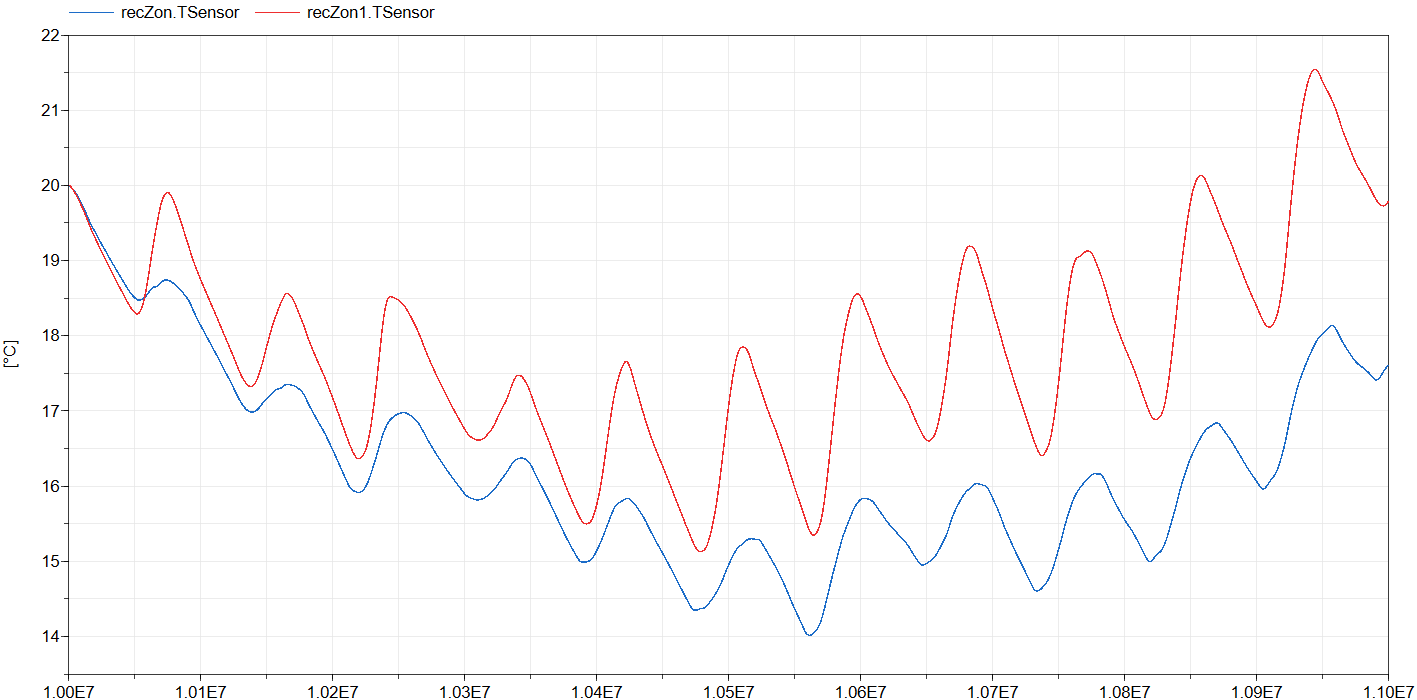
Note the different temperature responses of the zones.
Required models
- IDEAS.BoundaryConditions.SimInfoManager
- IDEAS.Buildings.Components.RectangularZoneTemplate
- Construction and glazing records from IDEAS.Examples.Tutorial.DetailedHouse.DetailedHouse1
Connection instructions
The model consists of two RectangularZoneTemplates and a SimInfoManager. The required parameters are set in
the templates, with careful attention to all tabs. The internal wall is defined in only one of the two
templates, while an external connection is used for the other template. The InternalWall and
External options cause a yellow bus connector to appear on each template, which must then be connected to each other.
The northern and southern wall both have a window of 1.5 m by 1.4 m (double glazing type Saint Gobain Planitherm).
Reference result
The figure below shows the operative zone temperatures of the zone with north oriented window (blue) and the zone with the south-oriented window (red). Note the large effect that the window placement has on the zone dynamics!
Parameters
| Type | Name | Default | Description |
|---|---|---|---|
| Modelica.Units.SI.Length | l | 8 | Zone length |
| Modelica.Units.SI.Length | w | 4 | Zone width |
| Modelica.Units.SI.Length | h | 2.8 | Zone height |
Components
| Type | Name | Default | Description |
|---|---|---|---|
| IDEAS.BoundaryConditions.SimInfoManager | sim | ||
| IDEAS.Buildings.Components.RectangularZoneTemplate | recZon | Northern part of the zone | |
| IDEAS.Buildings.Components.RectangularZoneTemplate | recZon1 | Southern part of the zone |
Contents
| Name | Description |
|---|---|
 MediumAir MediumAir | Air medium |