
packageDetailedHouse
Extends from Modelica.Icons.ExamplesPackage (Icon for packages containing runnable examples).
Information
This package contains examples with step-by-step instructions for how to build a system model
for an office building (using the detailed building envelope component models within IDEAS.Buildings)
with occupants, a radiator heating system connected to a heat pump, and a ventilation system.
It serves as a demonstration case of how the IDEAS library can be used.
The goal of this exercise is to become familiar with Modelica and the IDEAS library. Since the IDEAS library components are typically used by combining several components graphically, the use of equations falls outside of the scope of this exercise.
Firstly, develop a single-zone (office) building using the component models of the IDEAS.Buildings package, then add occupants. Secondly, move to a two-zone (office) building and add a heating system and a ventilation system (including their control). This exercise will extend from the single-zone ( IDEAS.Examples.Tutorial.DetailedHouse.DetailedHouse1) or two-zone ( IDEAS.Examples.Tutorial.DetailedHouse.DetailedHouse5) model in several steps, adding complexity. In between each step the user should be able to simulate the model, i.e., no errors should be produced and simulation results may be compared.
The model has been created in the following stages:
-
IDEAS.Examples.Tutorial.DetailedHouse.DetailedHouse1
represents a basic building model that includes a single zone, four walls, a window, a floor, and a ceiling
and serves as a starting model to implement the single-zone
DetailedHousemodel. - IDEAS.Examples.Tutorial.DetailedHouse.DetailedHouse2 implements solar shading extensions by adding a screen to the window model.
- IDEAS.Examples.Tutorial.DetailedHouse.DetailedHouse3 adds continuous occupancy of 1 person and LED lighting for the zone.
- IDEAS.Examples.Tutorial.DetailedHouse.DetailedHouse4 adds an occupancy schedule that assigns two occupants during office hours and zero otherwise. This schedule will be created using extensions of the IDEAS templates and replaceable models.
-
IDEAS.Examples.Tutorial.DetailedHouse.DetailedHouse5
This example shows the use of the
RectangularZoneTemplate. - IDEAS.Examples.Tutorial.DetailedHouse.DetailedHouse6 adds a heating system. The system consists of a water-water heat pump, radiators, a storage tank, circulation pumps, and a low-temperature heat source at constant temperature.
- IDEAS.Examples.Tutorial.DetailedHouse.DetailedHouse7 adds a controller that disables the heat pump when the supply water temperature exceeds 45◦C.
- IDEAS.Examples.Tutorial.DetailedHouse.DetailedHouse8 adds workflow automation, generating a CSV file at a userdefined location that contains data for each of the inputs of the block.
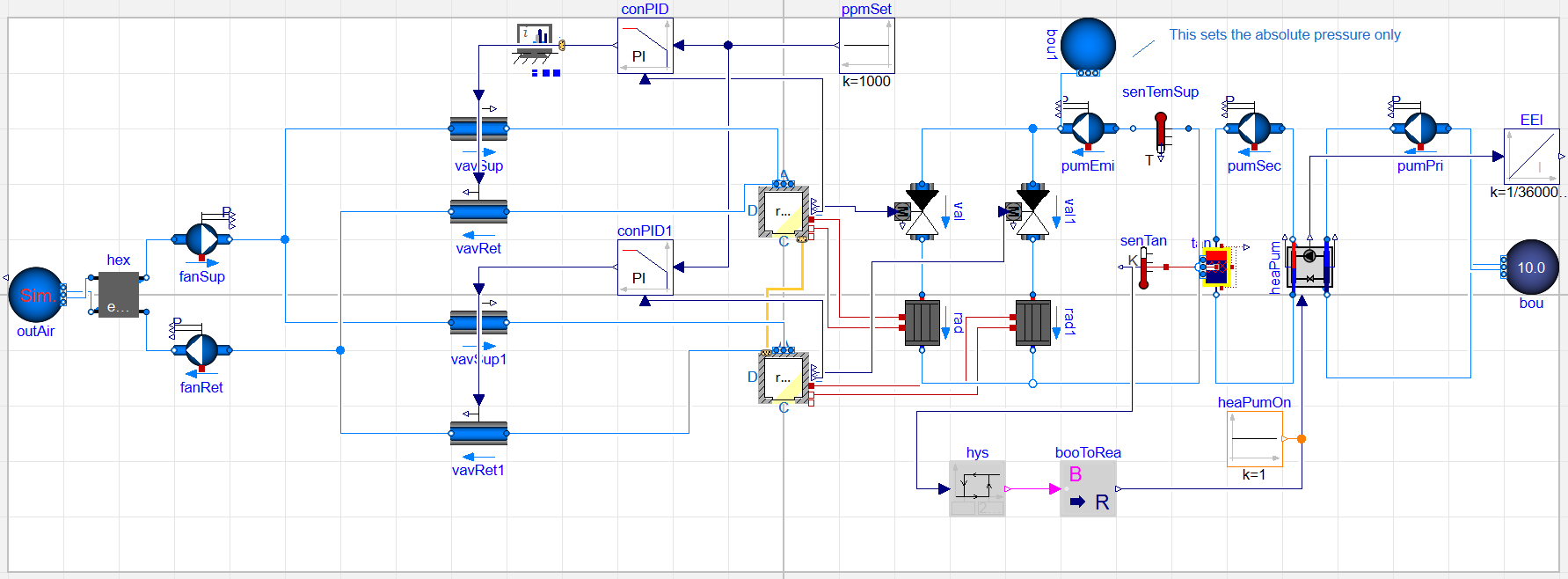
- IDEAS.Examples.Tutorial.DetailedHouse.DetailedHouse9 adds a CO2-controlled ventilation system. The occupancy model from IDEAS.Examples.Tutorial.DetailedHouse.DetailedHouse4 is added to one zone and a fixed occupancy of 1 person to the other zone. The ventilation system consists of two fans, two supply and two return air VAVs (Variable Air Volume), a heat recovery unit and an outdoor air source. The control consists of PI controllers with a setpoint of 1000 ppm.
- IDEAS.Examples.Tutorial.DetailedHouse.DetailedHouse10 removes small time constants from the model to decrease computation time.
For each stage, firstly the model part is qualitatively explained. Next, the names of the required Modelica models (from the Modelica Standard Library and/or IDEAS library) are listed. Finally, we provide high-level instructions of how to set up the model. If these instructions are not clear immediately, have a look at the model documentation and at the type of connectors the model has, try out some things, make an educated guess, etc. Finally, we provide reference results that allow you to check if your implementation is correct. Depending on the parameter values that you choose, results may differ.
The graphical representation of the final model is given below.
A more detailed explanation and step-by-step approach are provided in Exercises 3 and 4 of the Modelica Crash Course, developed by The SySi Team at KU Leuven. Links to these additional resources are available below.
Contents
| Name | Description |
|---|---|
 DetailedHouse1 DetailedHouse1 | First example model of a one-zone building |
| DetailedHouse2 | Adding solar screens |
| DetailedHouse3 | Adding occupancy and lighting |
| DetailedHouse4 | Including custom occupant schedule |
| DetailedHouse5 | New building model with two connected zones |
| DetailedHouse6 | Extension of DetailedHouse5 that adds a heating system |
| DetailedHouse7 | Adding a controller |
| DetailedHouse8 | JSON writer |
| DetailedHouse9 | Adding CO2-controlled ventilation |
| DetailedHouse10 | Speeding up the code |