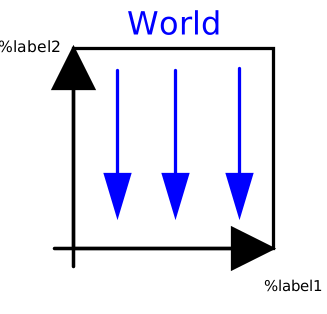
modelWorld

Information
Model World represents a global coordinate system fixed in ground. This model serves several purposes:
- It is used as inertial system in which the equations of all elements of the MultiBody library are defined.
- It is the world frame of an animation window in which all elements of the MultiBody library are visualized.
- It is used to define the gravity field in which a multi-body model is present. Default is a uniform gravity field where the gravity acceleration vector g is the same at every position. Additionally, a point gravity field or no gravity can be selected. Also, function gravityAcceleration can be redeclared to a user-defined function that computes the gravity acceleration, see example Examples.Elementary.UserDefinedGravityField.
- It is used to define default settings of animation properties (e.g., the diameter of a sphere representing by default the center of mass of a body, or the diameters of the cylinders representing a revolute joint).
- It is used to define a visual representation of the
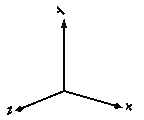
world model (= 3 coordinate axes with labels), of the defined
gravity field and of a ground plane perpendicular to the gravity direction.
Since the gravity field function is required from all bodies with mass and the default settings of animation properties are required from nearly every component, exactly one instance of model World needs to be present in every model on the top level. The basic declaration needs to be:
inner Modelica.Mechanics.MultiBody.World world
Note, it must be an inner declaration with instance name world in order that this world object can be accessed from all objects in the model. When dragging the "World" object from the package browser into the diagram layer, this declaration is automatically generated (this is defined via annotations in model World).
All vectors and tensors of a mechanical system are resolved in a frame that is local to the corresponding component. Usually, if all relative joint coordinates vanish, the local frames of all components are parallel to each other, as well as to the world frame (this holds as long as a Parts.FixedRotation, component is not used). In this "reference configuration" it is therefore alternatively possible to resolve all vectors in the world frame, since all frames are parallel to each other. This is often very convenient. In order to give some visual support in such a situation, in the icon of a World instance two axes of the world frame are shown and the labels of these axes can be set via parameters.
Parameters
| Type | Name | Default | Description |
|---|---|---|---|
| Boolean | enableAnimation | true | = true, if animation of all components is enabled |
| Boolean | animateWorld | true | = true, if world coordinate system shall be visualized |
| Boolean | animateGravity | true | = true, if gravity field shall be visualized (acceleration vector or field center) |
| Boolean | animateGround | false | = true, if ground plane shall be visualized |
| Types.AxisLabel | label1 | "x" | Label of horizontal axis in icon |
| Types.AxisLabel | label2 | "y" | Label of vertical axis in icon |
| Types.GravityTypes | gravityType | GravityTypes.UniformGravity | Type of gravity field |
| SI.Acceleration | g | Modelica.Constants.g_n | Constant gravity acceleration |
| Types.Axis | n | {0, -1, 0} | Direction of gravity resolved in world frame (gravity = g*n/length(n)) |
| Real | mu | 3.986004418e14 | Gravity field constant (default = field constant of earth) |
| Boolean | driveTrainMechanics3D | true | = true, if 3-dim. mechanical effects of Parts.Mounting1D/Rotor1D/BevelGear1D shall be taken into account |
| Animation › if animateWorld = true | |||
| SI.Distance | axisLength | nominalLength/2 | Length of world axes arrows |
| SI.Distance | axisDiameter | axisLength/defaultFrameDiameterFraction | Diameter of world axes arrows |
| Boolean | axisShowLabels | true | = true, if labels shall be shown |
| Animation › if animateGravity = true and gravityType = UniformGravity | |||
| SI.Position[3] | gravityArrowTail | {0, 0, 0} | Position vector from origin of world frame to arrow tail, resolved in world frame |
| SI.Length | gravityArrowLength | axisLength/2 | Length of gravity arrow |
| SI.Diameter | gravityArrowDiameter | gravityArrowLength/defaultWidthFraction | Diameter of gravity arrow |
| Animation › if animateGravity = true and gravityType = PointGravity | |||
| SI.Diameter | gravitySphereDiameter | 12742000 | Diameter of sphere representing gravity center (default = mean diameter of earth) |
| Animation › if animateGround = true and gravityType = UniformGravity | |||
| MultiBody.Types.Axis | groundAxis_u | if abs(n[1]) >= 0.99 then {0, 1, 0} else {1, 0, 0} | Vector along 1st axis (called u) of ground plane, resolved in world frame (should be perpendicular to gravity direction) |
| SI.Length | groundLength_u | 2 | Length of ground plane along groundAxis_u |
| SI.Length | groundLength_v | groundLength_u | Length of ground plane perpendicular to groundAxis_u |
| Defaults | |||
| SI.Length | nominalLength | 1 | Nominal length of multi-body system |
| SI.Length | defaultAxisLength | nominalLength/5 | Default for length of a frame axis (but not world frame) |
| SI.Length | defaultJointLength | nominalLength/10 | Default for the fixed length of a shape representing a joint |
| SI.Length | defaultJointWidth | nominalLength/20 | Default for the fixed width of a shape representing a joint |
| SI.Length | defaultForceLength | nominalLength/10 | Default for the fixed length of a shape representing a force (e.g., damper) |
| SI.Length | defaultForceWidth | nominalLength/20 | Default for the fixed width of a shape representing a force (e.g., spring, bushing) |
| SI.Length | defaultBodyDiameter | nominalLength/9 | Default for diameter of sphere representing the center of mass of a body |
| Real | defaultWidthFraction | 20 | Default for shape width as a fraction of shape length (e.g., for Parts.FixedTranslation) |
| SI.Length | defaultArrowDiameter | nominalLength/40 | Default for arrow diameter (e.g., of forces, torques, sensors) |
| Real | defaultFrameDiameterFraction | 40 | Default for arrow diameter of a coordinate system as a fraction of axis length |
| Real | defaultSpecularCoefficient | 0.7 | Default reflection of ambient light (= 0: light is completely absorbed) |
| Real | defaultN_to_m | 1000 | Default scaling of force arrows (length = force/defaultN_to_m) |
| Real | defaultNm_to_m | 1000 | Default scaling of torque arrows (length = torque/defaultNm_to_m) |
Connectors
| Type | Name | Default | Description |
|---|---|---|---|
| Interfaces.Frame_b | frame_b | Coordinate system fixed in the origin of the world frame |
Components
| Type | Name | Default | Description |
|---|---|---|---|
| Types.Color | axisColor_x | Modelica.Mechanics.MultiBody.Types.Defaults.FrameColor | Color of x-arrow |
| Types.Color | axisColor_y | axisColor_x | |
| Types.Color | axisColor_z | axisColor_x | Color of z-arrow |
| Types.Color | gravityArrowColor | {0, 230, 0} | Color of gravity arrow |
| Types.Color | gravitySphereColor | {0, 230, 0} | Color of gravity sphere |
| Types.Color | groundColor | {200, 200, 200} | Color of ground plane |
Contents
| Name | Description |
|---|---|
 gravityAcceleration gravityAcceleration |