
modelFriction
Use of model Stop
Extends from Modelica.Icons.Example (Icon for runnable examples).
Information
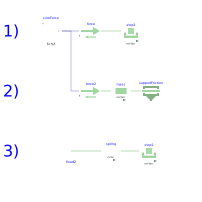
- Simulate and then plot stop1.f as a function of stop1.v This gives the Stribeck curve.
- The same model is also available by modeling the system with a Mass and a SupportFriction model. The SupportFriction model defines the friction characteristic with a table. The table is constructed with function Examples.Utilities.GenerateStribeckFrictionTable(…) to generate the same friction characteristic as with stop1. The simulation results of stop1 and of model mass are therefore identical.
- Model stop2 gives an example for a hard stop. However there can arise some problems with the used modeling approach (use of reinit(…), convergence problems). In this case use the ElastoGap to model a stop (see example Preload).
Components
| Type | Name | Default | Description |
|---|---|---|---|
| Modelica.Mechanics.Translational.Components.MassWithStopAndFriction | stop1 | ||
| Translational.Sources.Force | force | ||
| Modelica.Blocks.Sources.Sine | sineForce | ||
| Modelica.Mechanics.Translational.Components.MassWithStopAndFriction | stop2 | ||
| Translational.Components.Spring | spring | ||
| Translational.Components.Fixed | fixed2 | ||
| Translational.Sources.Force | force2 | ||
| Components.Mass | mass | ||
| Components.SupportFriction | supportFriction |