
modelPadeDelay2
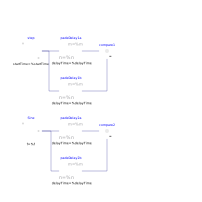
PadeDelay: Compare balance = false with balance = true setting
Extends from Modelica.Icons.Example (Icon for runnable examples).
Information
The setting with order=4 gives the same result with balance=false and balance=true. If order=5 or higher is set, then the balance=false setting gives extremely slow simulation. If the balance=false blocks are removed, the simulation is very fast. This shows the improvements in the numerics when balance=true is set.
Parameters
| Type | Name | Default | Description |
|---|---|---|---|
| Integer | n | 4 | Order of Pade approximation |
| SI.Time | delayTime | 0.001 | Delay time of output with respect to input signal |
Components
| Type | Name | Default | Description |
|---|---|---|---|
| Modelica.Blocks.Nonlinear.PadeDelay | padeDelay1b | ||
| Modelica.Blocks.Sources.Step | step | ||
| Modelica.Blocks.Math.Feedback | compare1 | ||
| Modelica.Blocks.Nonlinear.PadeDelay | padeDelay2a | ||
| Modelica.Blocks.Nonlinear.PadeDelay | padeDelay2b | ||
| Modelica.Blocks.Math.Feedback | compare2 | ||
| Modelica.Blocks.Sources.Sine | Sine | ||
| Modelica.Blocks.Nonlinear.PadeDelay | padeDelay1a |