
modelDetailedHouse8
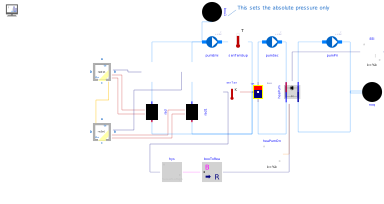
Extends from DetailedHouse7 (Adding a controller).
Information
Extracting results from Dymola can be tedious. Therefore, several custom tools have been developed to facilitate exporting simulation results. For time-series data, a generic CSV writer can be found in IDEAS.Utilities.IO.Files.JSONWriter. This model generates a CSV file at a user-defined location that contains data for each of the inputs of the block. The delimiter can be modified in the advanced parameter tab. The model IDEAS.Utilities.IO.Files.CombiTimeTableWriter, does the same, albeit using a slightly different file format which can be read directly back into Modelica using the file reader Modelica.Blocks.Sources.CombiTimeTable.
In this example we will not output time series data, only a single value: the total electricity consumption at the end
of the simulation, using the JSON file format. Note that the external library ExternData can be used to read
JSON files.
Required models
Connection instructions
Add the model, choose a file path and indicate the appropriate time when the result should be saved. Connect the appropriate signal to the input of the block.
Reference result
Check the contents of the generated file. Depending on the chosen value for the parameter
varKeys, the result should be similar to: {"Electrical energy [kWh]"}: 1.7425569229e+01
Parameters
| Type | Name | Default | Description |
|---|---|---|---|
| Modelica.Units.SI.Length | l (from DetailedHouse5) | 8 | Zone length |
| Modelica.Units.SI.Length | w (from DetailedHouse5) | 4 | Zone width |
| Modelica.Units.SI.Length | h (from DetailedHouse5) | 2.8 | Zone height |