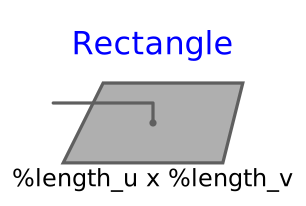
modelRectangle
Visualizing a planar rectangular surface
Extends from Modelica.Mechanics.MultiBody.Interfaces.PartialVisualizer (Base model for visualizers (has a frame_a on the left side + outer world + assert to guarantee that the component is connected)).
Information
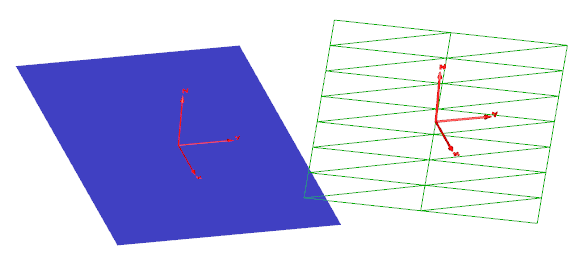
This model visualizes a planar rectangle. The center of the rectangle is located at connector frame_a (visualized by the red coordinate system in the figure below). The figure below shows two rectangles of the same parameters
nu = 8,
nv = 3,
length_u = 3,
length_v = 2.
The green rectangle on the right is visualized in wireframe thus highlighting the influence of the discretization. Moreover, the u-axis of this rectangle is modified so that the rectangle is rotated about the z-axis of frame_a.
Parameters
| Type | Name | Default | Description |
|---|---|---|---|
| Boolean | animation | true | = true, if animation shall be enabled |
| MultiBody.Types.Axis | direction_u | {1, 0, 0} | Vector along u-axis of rectangle resolved in frame_a |
| MultiBody.Types.Axis | direction_v | {0, 1, 0} | Vector along v-axis of rectangle resolved in frame_a |
| SI.Distance | length_u | 3 | Length of rectangle in direction u |
| SI.Distance | length_v | 1 | Length of rectangle in direction v |
| Discretization | |||
| Integer | nu | 3 | Number of points in direction u |
| Integer | nv | 2 | Number of points in direction v |
| Material properties | |||
| Boolean | wireframe | false | = true: 3D model will be displayed without faces |
Connectors
| Type | Name | Default | Description |
|---|---|---|---|
| Interfaces.Frame_a | frame_a (from PartialVisualizer) | Coordinate system in which visualization data is resolved |
Components
| Type | Name | Default | Description |
|---|---|---|---|
| Modelica.Mechanics.MultiBody.Types.RealColor | color | {0, 128, 255} | Color of surface |
| Types.SpecularCoefficient | specularCoefficient | 0.7 | Reflection of ambient light (= 0: light is completely absorbed) |
| Real | transparency | 0 | Transparency of shape: 0 (= opaque) ... 1 (= fully transparent) |