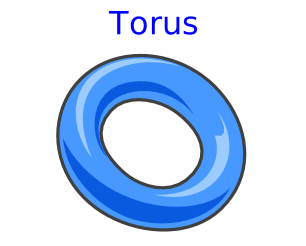
modelTorus
Extends from Modelica.Mechanics.MultiBody.Interfaces.PartialVisualizer (Base model for visualizers (has a frame_a on the left side + outer world + assert to guarantee that the component is connected)).
Information
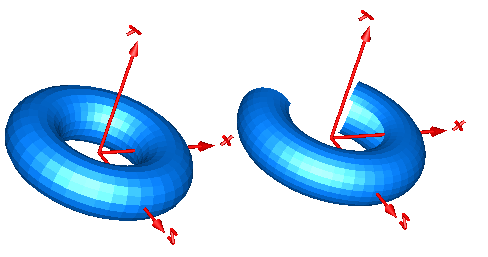
Model Torus visualizes a torus. The center of the torus is located at connector frame_a (visualized by the red coordinate system in the figure below). The left image below shows a torus with R = 0.5 m and r = 0.2 m. The right images below shows the torus with the additional parameter settings:
opening    =   45 degree
startAngle = -135 degree
stopAngle  =  135 degree
In the advanced menu the discretization of the surface visualization can be defined by
the number nR of points along the major radius of the torus and by
the number nr of points along the minor radius of the torus.
In case the torus is closed (that is, opening = 0 degree),
the actual number of points is one less (that is nR - 1, nr - 1), because the first and
the last point of the parametrization coincide in this case.
Parameters
| Type | Name | Default | Description |
|---|---|---|---|
| Boolean | animation | true | = true, if animation shall be enabled |
| SI.Radius | R | 0.5 | Major radius (distance from center of torus to center of tube) |
| SI.Radius | r | 0.1 | Minor radius (radius of tube) |
| SI.Angle | opening | 0 | Opening angle of torus |
| SI.Angle | startAngle | -3.1415926535898 | Start angle of torus slice |
| SI.Angle | stopAngle | 3.1415926535898 | End angle of torus slice |
| Material properties | |||
| Boolean | wireframe | false | = true: 3D model will be displayed without faces |
| Discretization | |||
| Integer | n_R | 40 | Number of points along major radius R |
| Integer | n_r | 20 | Number of points along minor radius r |
Connectors
| Type | Name | Default | Description |
|---|---|---|---|
| Interfaces.Frame_a | frame_a (from PartialVisualizer) | Coordinate system in which visualization data is resolved |
Components
| Type | Name | Default | Description |
|---|---|---|---|
| Modelica.Mechanics.MultiBody.Types.RealColor | color | {0, 128, 255} | Color of surface |
| Types.SpecularCoefficient | specularCoefficient | 0.7 | Reflection of ambient light (= 0: light is completely absorbed) |
| Real | transparency | 0 | Transparency of shape: 0 (= opaque) ... 1 (= fully transparent) |
Revisions
- July 2010 by Martin Otter
Adapted to the new Surface model. - July 2005 by Dirk Zimmer (practical training at DLR)
First version to visualize a multi-level tyre wheel model.