
modelAnderson
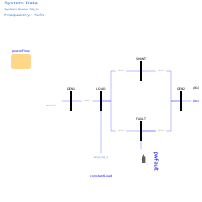
Extends from OpenIPSL.Tests.BaseClasses.SMIB (SMIB - Single Machine Infinite Base system with one load.).
Information
This example demonstrates the use of records with synchronous machine, excitation system, power system stabilizer and turbine-governor model parameters, based on data sets published in [Anderson2002]. The generator group for this example includes a GENROE machine together with an ESDC1A excitation system model, an IEE2ST PSS model and an IEESGO turbine-governor model.
Instructions
Please start by completing the 3 first steps of the instructions in
GenerationGroup.Generator2.
A OpenIPSL.Data.PowerPlant.GUDynamics record must be dragged and dropped
into that model and its GUnitDynamics parameter must be propagated before
continuing with the following steps:
- Open the parameter window of the generation group component.
- Choose the appropriate parameter data set for the generating unit dynamics
from the
GUnitDynamicsdropdown list. To do this, double-click thegenerator1component. Then, expand the drop-down list of theGUnitDynamicsparameter. Finally, choose the Anderson Fossil Steam Unit 15 (448 MVA) option. - Choose the right data set for the
powerFlowrecord. The procedure is very similar as in the previous step. This time just expand the drop-down list of thePowerFlowparameter of thepowerFlowrecord. Choose the PF solutions for Pload = 50 MW option. - Insert component references to the
powerFlowrecord to define the initial power flow values. This has to be done for the following components:- generator1:
P_0=powerFlow.powerFlow.machines.PG1;Q_0=powerFlow.powerFlow.machines.QG1;v_0=powerFlow.powerFlow.bus.v1;angle_0=powerFlow.powerFlow.bus.A1. - gENCLS:
P_0=powerFlow.powerFlow.machines.PG2;Q_0=powerFlow.powerFlow.machines.QG2;v_0=powerFlow.powerFlow.bus.v2;angle_0=powerFlow.powerFlow.bus.A2. - constantLoad: P_0=
powerFlow.powerFlow.loads.PL1;Q_0=powerFlow.powerFlow.loads.QL1;v_0=powerFlow.powerFlow.bus.v3;angle_0=powerFlow.powerFlow.bus.A3.
- generator1:
- Go back to the instructions in
GenerationGroup.Generator2and follow step 4.
Components
| Type | Name | Default | Description |
|---|---|---|---|
| OpenIPSL.Electrical.Branches.PwLine | pwLine (from SMIB) | ||
| OpenIPSL.Electrical.Branches.PwLine | pwLine3 (from SMIB) | ||
| OpenIPSL.Electrical.Branches.PwLine | pwLine4 (from SMIB) | ||
| OpenIPSL.Electrical.Machines.PSSE.GENCLS | gENCLS (from SMIB) | ||
| OpenIPSL.Electrical.Loads.PSSE.Load_variation | constantLoad (from SMIB) | ||
| OpenIPSL.Electrical.Events.PwFault | pwFault (from SMIB) | ||
| OpenIPSL.Electrical.Buses.Bus | GEN1 (from SMIB) | ||
| OpenIPSL.Electrical.SystemBase | SysData (from SMIB) | ||
| OpenIPSL.Electrical.Buses.Bus | LOAD (from SMIB) | ||
| OpenIPSL.Electrical.Buses.Bus | GEN2 (from SMIB) | ||
| OpenIPSL.Electrical.Buses.Bus | FAULT (from SMIB) | ||
| Electrical.Branches.PwLine | pwLine1 (from SMIB) | ||
| Electrical.Branches.PwLine | pwLine2 (from SMIB) | ||
| Electrical.Buses.Bus | SHUNT (from SMIB) | ||
| GenerationGroup.Generator2 | generator1 | ||
| PFData.PowerFlow | powerFlow |