 .Buildings.Examples.Tutorial.SpaceCooling.System3 .Buildings.Examples.Tutorial.SpaceCooling.System3
This part of the system model modifies Buildings.Examples.Tutorial.SpaceCooling.System2 to use the actual outside temperature for a summer day, and it adds closed loop control. The closed loop control measures the room temperature and switches the chilled water flow rate on or off.
This section describes how we modified Buildings.Examples.Tutorial.SpaceCooling.System2 to build this model.
The first step was to copy the model Buildings.Examples.Tutorial.SpaceCooling.System2.
Next, we changed in weaDat the parameter that
determines whether the outside dry bulb temperature is used from
the weather data file or set to a constant value. This can be
accomplished in the GUI of the weather data reader as follows:

With this change to using real weather data, we also change the simulation time to be one day during the summer, where the start time is 4320 h (15552000 s) and the stop time is 4344 h (15638400 s).
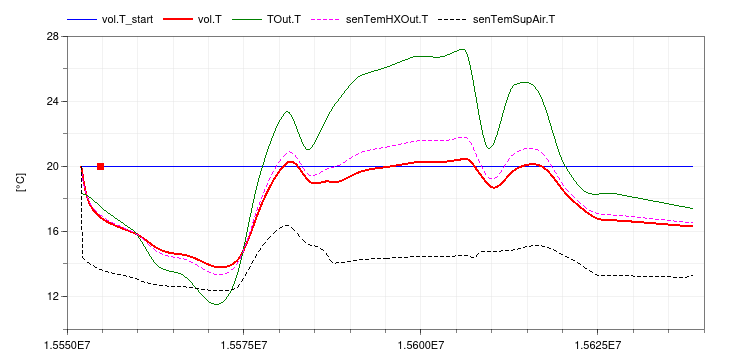
If the model is now simulated, the following plot could be generated that shows that the room is cooled too much due to the open loop control:
To add closed loop control, we proceeded as follows.
First, we made an instance of Buildings.Controls.OBC.CDL.Reals.Subtract
and set its name to sub. It calculates the difference
between the set point and the measured temperature.
For the set point, we made the instance TRooSetPoi
to feed a constant set point into the instance
sub.
The output of the instance sub was then fed as the
input to con, which is an instance of Buildings.Controls.OBC.CDL.Reals.Hysteresis.
For the instance con, we set the parameter for the
lower limit to -0.5 and the upper limit to 0.5.
The instance senTemRoo has been added to measure
the room air temperature. Note that we decided to measure directly
the room air temperature. If we would have used a temperature
sensor in the return air stream, then its temperature would never
change when the mass flow rate is zero, and hence it would not
measure how the room temperature changes when the fan is off.
Since the controller output is a boolean signal, but the
instance souWat needs a real signal as an input for
the water mass flow rate, we needed to add a conversion block. We
therefore replaced the instance mWat_flow from a
constant block to the block Buildings.Controls.OBC.CDL.Conversions.BooleanToReal.
Because the cooling control has a reverse action, i.e., if the
measured value exceeds the set point, the system should switch on
instead of off, we configured the parameters of the conversion
block as follow:
  realTrue=0
  realFalse=mW_flow_nominal
This will output mW_flow_nominal when the room
temperature is above the set point, and 0 otherwise.
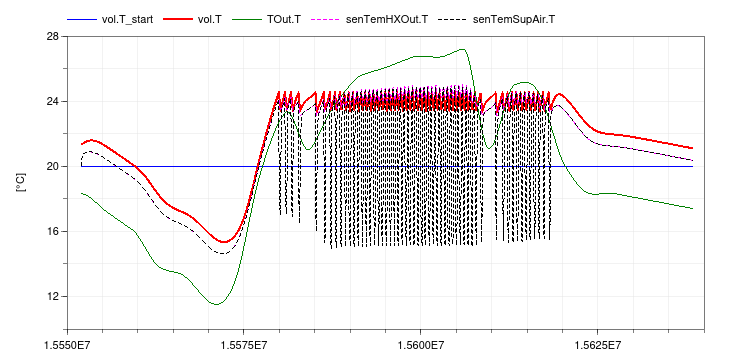
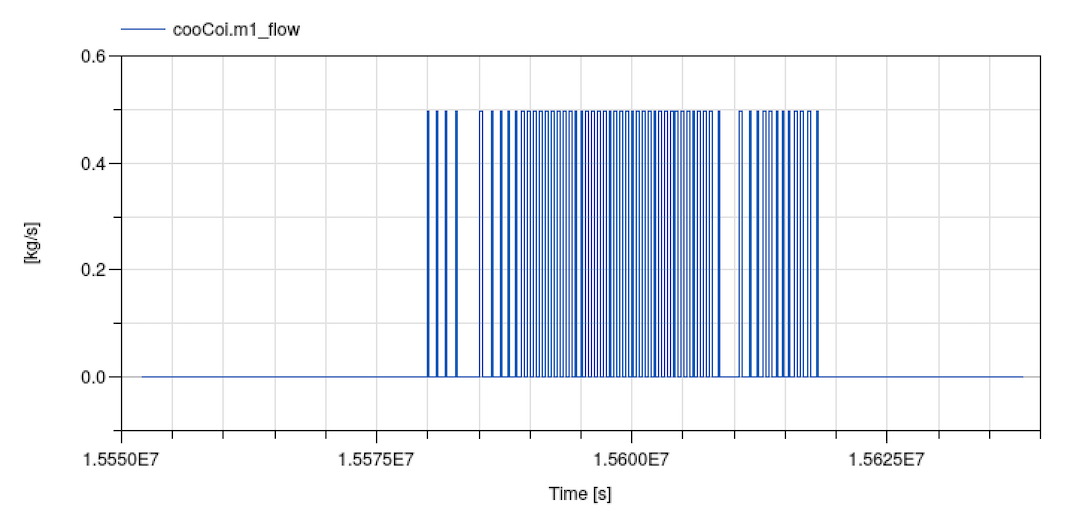
This completes building the model shown in the figure on Buildings.Examples.Tutorial.SpaceCooling. When simulating the model, the response shown below should be seen.
To add a continuous controller for the coil water flow rate, we could have used the model Buildings.Controls.OBC.CDL.Reals.PID.
| Name | Description |
|---|---|
 MediumA MediumA |
Medium for air |
 MediumW MediumW |
Medium for water |
nominalValuesDefineDefaultPressureCurve=true
in the mover component to suppress a warning. This is for #3819.OnOffController. This is for #3595.Modelica.Fluid.System to address issue
#311.