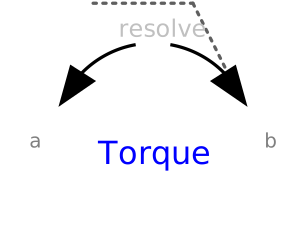
modelTorque
Extends from Modelica.Mechanics.MultiBody.Interfaces.PartialTwoFrames (Base model for components providing two frame connectors + outer world + assert to guarantee that the component is connected).
Information
The 3 signals of the torque connector are interpreted as the x-, y- and z-coordinates of a torque acting at the frame connector to which frame_b of this component is attached. Via parameter resolveInFrame it is defined, in which frame these coordinates shall be resolved:
| Types.ResolveInFrameAB. | Meaning |
|---|---|
| world | Resolve input torque in world frame |
| frame_a | Resolve input torque in frame_a |
| frame_b | Resolve input torque in frame_b (= default) |
| frame_resolve | Resolve input torque in frame_resolve (frame_resolve must be connected) |
If resolveInFrame = ResolveInFrameAB.frame_resolve, the torque coordinates are with respect to the frame, that is connected to frame_resolve.
If torque={100,0,0}, and for all parameters the default setting is used, then the interpretation is that a torque of 100 N.m is acting along the positive x-axis of frame_b.
Note, the cut-forces in frame_a and frame_b (frame_a.f, frame_b.f) are always set to zero and the cut-torque at frame_a (frame_a.t) is the same as the cut-torque at frame_b (frame_b.t) but with opposite sign.
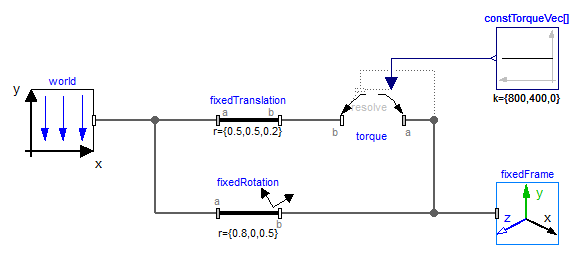
An example how to use this model is given in the following figure:
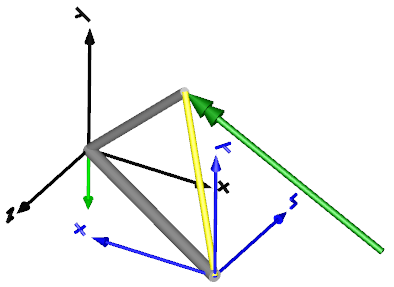
This leads to the following animation (the yellow cylinder characterizes the line between frame_a and frame_b of the Torque component, i.e., the torque acts with negative sign also on the opposite side of this cylinder, but for clarity this is not shown in the animation):
Parameters
| Type | Name | Default | Description |
|---|---|---|---|
| Boolean | animation | true | = true, if animation shall be enabled |
| Modelica.Mechanics.MultiBody.Types.ResolveInFrameAB | resolveInFrame | Modelica.Mechanics.MultiBody.Types.ResolveInFrameAB.frame_b | Frame in which input force is resolved (1: world, 2: frame_a, 3: frame_b, 4: frame_resolve) |
Connectors
| Type | Name | Default | Description |
|---|---|---|---|
| Interfaces.Frame_a | frame_a (from PartialTwoFrames) | Coordinate system a fixed to the component with one cut-force and cut-torque | |
| Interfaces.Frame_b | frame_b (from PartialTwoFrames) | Coordinate system b fixed to the component with one cut-force and cut-torque | |
| Interfaces.Frame_resolve | frame_resolve | The input signals are optionally resolved in this frame | |
| Modelica.Blocks.Interfaces.RealInput[3] | torque | x-, y-, z-coordinates of torque resolved in frame defined by resolveInFrame |
Components
| Type | Name | Default | Description |
|---|---|---|---|
| SI.Diameter | connectionLineDiameter | world.defaultArrowDiameter | Diameter of line connecting frame_a and frame_b |
| Types.Color | torqueColor | Modelica.Mechanics.MultiBody.Types.Defaults.TorqueColor | Color of torque arrow |
| Types.Color | connectionLineColor | Modelica.Mechanics.MultiBody.Types.Defaults.SensorColor | Color of line connecting frame_a and frame_b |
| Types.SpecularCoefficient | specularCoefficient | world.defaultSpecularCoefficient | Reflection of ambient light (= 0: light is completely absorbed) |
| Internal.BasicTorque | basicTorque |